Using snippets
The snippet engine of coc.nvim can expand VS Code snippet and UltiSnips snippet formats.
Most UltiSnips snippet features should work, except for UltiSnips-snippet-actions and some regex patterns that are not supported by JavaScript (including (?x), (?s), \Z, and (?(id/name)yes-pattern|no-pattern), which are rarely used).
Note: coc.nvim's snippet engine can expand snippet-format completion items provided by language servers. To load and expand custom snippets (VS Code or UltiSnips snippet files), install coc-snippets.
There are also extensions like coc-ultisnips and coc-neosnippet that provide basic completion support for snippets only.
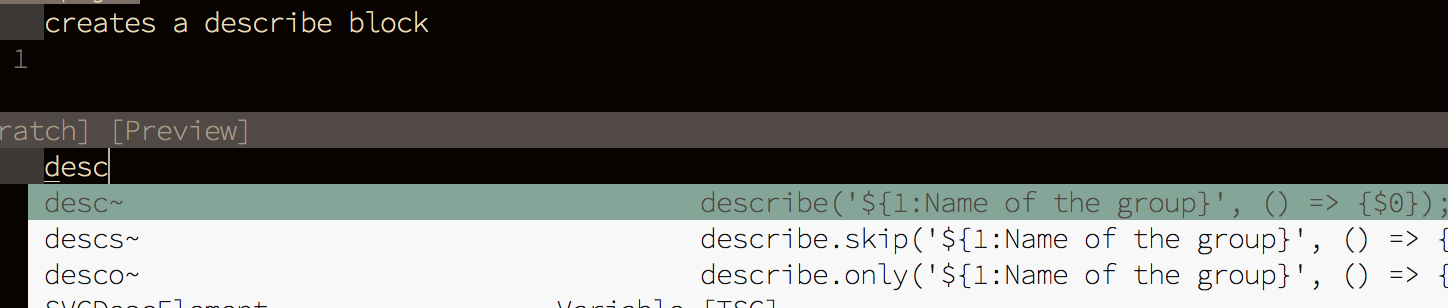
A completion item of snippet kind is shown with ~ appended to its label by default:

Note: when the snippet format of a completion item is set on completion resolve, you won't see ~; this is a limitation of vim.
The snippet is designed to expand only when the completion is confirmed (<C-y> by default), so the user can decide whether to expand the snippet.
To make <cr> confirm completion, use this insert-mode mapping:
inoremap <silent><expr> <cr> pumvisible() ? coc#pum#select_confirm() :
\"\<C-g>u\<CR>\<c-r>=coc#on_enter()\<CR>"-
coc#pum#select_confirm()helps select the first completion item when necessary and sends<C-y>to vim to confirm the completion. -
\<C-g>uis used to break the undo chain at the current position. -
coc#on_enter()notifies coc.nvim that you have pressed<enter>, so it can format your code on<enter>.
Note: some plugins are known to overwrite your <CR> mappings, so your custom key-mapping won't work. Check your <CR> mapping with :verbose imap <CR>.
A snippet session is cancelled under the following conditions:
-
InsertEnteris triggered outside a snippet. - A content change at the final placeholder.
- A content change is detected after the snippet.
- A content change in a snippet that doesn't occur at a placeholder.
You can nest snippets in an active snippet session, just like in VS Code and UltiSnips. An UltiSnips snippet can be nested inside a VS Code snippet and vice versa!
If you don't want to expand a snippet on completion, use <C-n> to insert the extracted text without confirming the completion, or check your language server's options to disable snippet completion items.
To navigate forward or backward between snippet placeholders, the default keymaps are <C-j> and <C-k> (added to the buffer keymaps when a snippet session is activated).
The global variables g:coc_snippet_next and g:coc_snippet_prev can be used to modify the keymaps.
To make snippet completion work just like in VS Code, install coc-snippets, then create a keymap for <tab>:
inoremap <silent><expr> <TAB>
      \ pumvisible() ? coc#pum#select_confirm() :
      \ coc#expandableOrJumpable() ? "\<C-r>=coc#rpc#request('doKeymap', ['snippets-expand-jump',''])\<CR>" :
      \ CheckBackSpace() ? "\<TAB>" :
      \ coc#refresh()

function! CheckBackSpace() abort
  let col = col('.') - 1
  return !col || getline('.')[col - 1]  =~# '\s'
endfunction

let g:coc_snippet_next = '<tab>'
to your .vimrc (or init.vim for Neovim).
Related configurations:
-
suggest.snippetIndicator: indicator text for snippets shown in the completion menu; defaults to~. -
suggest.preferCompleteThanJumpPlaceholder: enable this when you want to use the same key to confirm completion and jump to placeholders; defaults tofalse. -
snippet.statusText: text shown instatuslineto indicate that a snippet session is activated. -
snippet.highlight: whentrue, use theCocSnippetVisualhighlight group to highlight placeholders with the same index as the current one.
To load VS Code snippets, you need to install the coc-snippets extension.
Then install a VS Code snippets extension from GitHub:
:CocInstall https://github.com/andys8/vscode-jest-snippets
Open a file with a snippet-related filetype (for example, a foo.js file as javascript) and type some of the prefix characters.
Tip: VS Code snippets extensions can also be installed using plugin managers.