English | 中文
A starter template for creating PowerPoint presentations using JSX + TypeScript with pptxgenjs. Build slides declaratively, preview instantly in the browser, and generate professional .pptx files.
- JSX syntax — write slides with React-style components (
<Slide>,<Text>,<Rect>,<Image>) - TypeScript — full type safety
- Dev server — real-time preview in browser
- Export — generate
.pptxfiles with a single command - Rich component set — shapes, charts, tables, images, rich text, speaker notes
Click the Use this template button on GitHub — it creates a fresh repository under your account with no shared history.
If you prefer working locally without creating a GitHub repository first.
tiged downloads a clean copy of the template — no .git history, no upstream remote — so you start with a blank slate just like "Use this template" but without leaving the terminal:
npx tiged zythum/pptxgen-ts-starter my-presentation
cd my-presentation
npm installgit clone https://github.com/zythum/pptxgen-ts-starter.git my-presentation
cd my-presentation
npm installThis starter works best when you give an AI assistant a clear brief instead of only asking it to “make a PPT.” The prompt should describe the audience, purpose, content, visual direction, and delivery requirements. The AI should then create editable, code-generated PowerPoint slides in this repository—not screenshots or static HTML.
Install the companion skill once:
npx skills add zythum/pptxgen-ts-starter-skill -gAfter that a plain request — “做个 PPT,主题是 X” / “make a deck about X” — is enough. The skill scaffolds this template, runs npm install, and hands off to the template's own skills. It only bootstraps; all design work still happens inside the generated project.
Prefer to drive it yourself, or want to hand over a fuller brief? Read on.
Please create a PPT project based on https://github.com/zythum/pptxgen-ts-starter.
The topic is “<your topic>”.
This is enough to start a task, but a more complete brief will produce a better structure and fewer assumptions.
Here are two practical examples:
Please create a PPT project based on https://github.com/zythum/pptxgen-ts-starter.
The topic is “Introducing the Kimi K3 model.” Please research and verify public sources, use a Xiaohongshu-inspired style, and create around 5 slides. Cite sources for important information and do not invent unverified facts.
Please create a PPT project based on https://github.com/zythum/pptxgen-ts-starter.
Please create a middle-school Chinese language lesson deck on the classical Chinese poem “江雪” Use an ink-wash style and design it for a session of about 20 minutes. Include the lesson structure, key teaching points, and classroom interaction.
Provide as many of these details as possible:
Topic:
Audience:
Use case:
Talk length:
Target slide count:
One sentence the audience should remember:
Action the audience should take afterward:
Required content:
Available data and sources:
Data cutoff date:
Required images, logos, or brand guidelines:
Visual direction:
Content or claims that must not appear:
Delivery requirements: PPTX, speaker notes, PDF, source code, asset list, etc.
At minimum, cover these eight areas: topic, audience, use case, goal, content materials, slide count and timing, visual direction, and delivery requirements.
Label the input explicitly so the AI knows what it may use directly:
- Facts — sourced or verifiable information, such as “July active customers were 1,240.”
- Opinions — judgments you want the presentation to express, such as “Self-service onboarding is the most promising growth channel.”
- Recommendations — proposed next actions, such as “Pilot templates in two industries.”
- To confirm — missing information that must not be presented as fact, such as “Is retention affected by pricing?”
Do not let the AI invent growth rates, market shares, customer names, competitor information, case-study results, or other unsupported details. Mark missing information as TBD or needs verification instead.
Please create a “magazine-style” PPTX project based on https://github.com/zythum/pptxgen-ts-starter. The topic is “城市更新中的新生活方式” (“New Lifestyles in Urban Renewal”).

Audience and goal
Audience: Brands and content teams focused on urban lifestyles
Setting: 20-minute internal sharing
Goal: Help the audience understand how urban renewal is changing lifestyles
Target length: 10 slides

Content directions
- Urban spaces are shifting from “passage” to “staying”
- Old factories, community retail, and public spaces
- City content in the past vs. city content today
- People are buying participation, not just function

Visual requirements
1. Make the overall deck feel like a special feature produced by an editorial team: large headlines, generous whitespace, images, and short phrases placed side by side.
2. Use a widescreen canvas; keep one main conclusion on each slide.
3. Use black, off-white, and gray as the base colors, with only one bright accent color.
4. Use a large image or oversized type on the cover and section slides; use clear metrics or comparison structures on data slides.
5. Perform a visual preflight for every image and record its source, aspect ratio, crop method, and copyright status. When no image is available, use procedurally drawn graphics instead of inventing image sources.
6. Do not use large numbers of rounded cards or turn every slide into the same card grid.
When working in this repository, ask the AI to use the existing JSX + TypeScript workflow, shared design tokens in src/token/, reusable components in src/components/, and the .deck/ workspace. It should validate text fit, image aspect ratios, type checking, linting, and PPTX generation before delivery. The result is a repeatable, editable native .pptx file rather than a rendered image.
pptxgen-ts-starter/
├── scripts/
│   ├── color-tool.ts      # derive palette variants + check WCAG contrast
│   ├── dev-server.ts      # dev server with browser preview
│   ├── estimate-text.ts   # measure rendered text height (prevent overflow)
│   ├── generate-pptx.ts   # CLI .pptx builder
│   └── image-tool.ts      # query image metadata, crop, resize
├── src/
│   ├── ppt.tsx            # deck entry — compose slides here
│   ├── slides/            # one file per slide: 01-title.tsx, 02-*.tsx …
│   ├── components/        # shared UI: SlideBackground, SectionHeader, Card
│   ├── token/             # design tokens — single source of truth
│   │   ├── colors.ts      #   palette roles (mirror of .deck/spec.md §3)
│   │   └── typography.ts  #   font + size scale (mirror of .deck/spec.md §4)
│   └── media/images/      # image assets (paths relative to src/ppt.tsx)
├── web/
│   └── index.html         # browser-based PPTX viewer
├── .agents/
│   └── skills/
│       ├── pptxgenjsx/    # component API reference
│       └── design/        # design guidance: workflow + templates & themes
├── .deck/                 # per-deck workspace: brief.md / research.md / outline.md / spec.md
├── output/                # generated .pptx files
├── AGENTS.md              # detailed slide authoring guide (primary reference for agents)
├── package.json
├── tsconfig.json
└── .gitignore
The starter contains the following npm scripts:
| Command | Action |
|---|---|
npm run dev |
Dev server at localhost:5173 (refresh browser to see changes) |
npm run generate |
Build output/presentation.pptx |
npm run typecheck |
Type check, no emit |
npm run lint |
Lint with oxlint |
npm run format |
Format with oxfmt |
Utility scripts help verify slide layout and derive design tokens before generating the final .pptx:
scripts/estimate-text.ts— measure rendered text height to prevent overflowscripts/image-tool.ts— query image metadata, crop, or resize imagesscripts/color-tool.ts— derive palette variants (lighten / darken / desaturate) and check WCAG contrast ratios
See AGENTS.md for full usage details and examples.
Start customizing:
- Change the
namefield inpackage.json - Replace slide files in
src/slides/with your own content - Clean up this
README.md
.agents/skills/ ships two skills that teach AI assistants how to build slides in this starter:
pptxgenjsx— component API reference: every component, prop, and pattern for authoring slides with JSX.design— design guidance: a seven-stage contract (clarify, research decision, outline, spec, compose/visuals as a per-slide coupled phase, QA) plus templates & themes (styles, palettes, typography, core/registered layouts, density, narrative).
Skills are loaded on demand — see the AGENTS.md guide for when and how to use each one.
The two skills above only apply inside a scaffolded project. To go from a bare request straight to a working project, install the companion front-door skill:
npx skills add zythum/pptxgen-ts-starter-skill -gIt lives in pptxgen-ts-starter-skill — a separate repository, so this template stays free of distribution-only files — and its only job is to scaffold this template, run npm install, and hand off to the two skills above.
For detailed authoring instructions — conventions, workflow, common mistakes, and component API — see AGENTS.md. This is the primary reference for both human contributors and AI coding assistants.
- Guizang PPT Skill https://github.com/op7418/guizang-ppt-skill
- ppt-master https://github.com/hugohe3/ppt-master
- Tailwind CSS colors https://tailwindcss.com/docs/colors
- McKinsey color reference https://colorcodeguide.com/official/mckinsey
- Monocle style reference https://styles.refero.design/style/9165ecb1-f068-4093-8783-1f3c98898b8a
Here are some simple examples using deepseek-v4-flash.
Please create a PPT project based on https://github.com/zythum/pptxgen-ts-starter.
The topic is “Introducing the Kimi K3 model.” Please research and verify public sources, use a Xiaohongshu-inspired style, and create around 5 slides. Cite sources for important information and do not invent unverified facts.
请基于 https://github.com/zythum/pptxgen-ts-starter
创建一个 PPT 项目,主题是“介绍 Kimi K3 模型”。请自行查找并核实公开资料,采用小红书风格,制作 5 页左右的内容。请标注重要信息的来源,不要编造未经验证的事实。
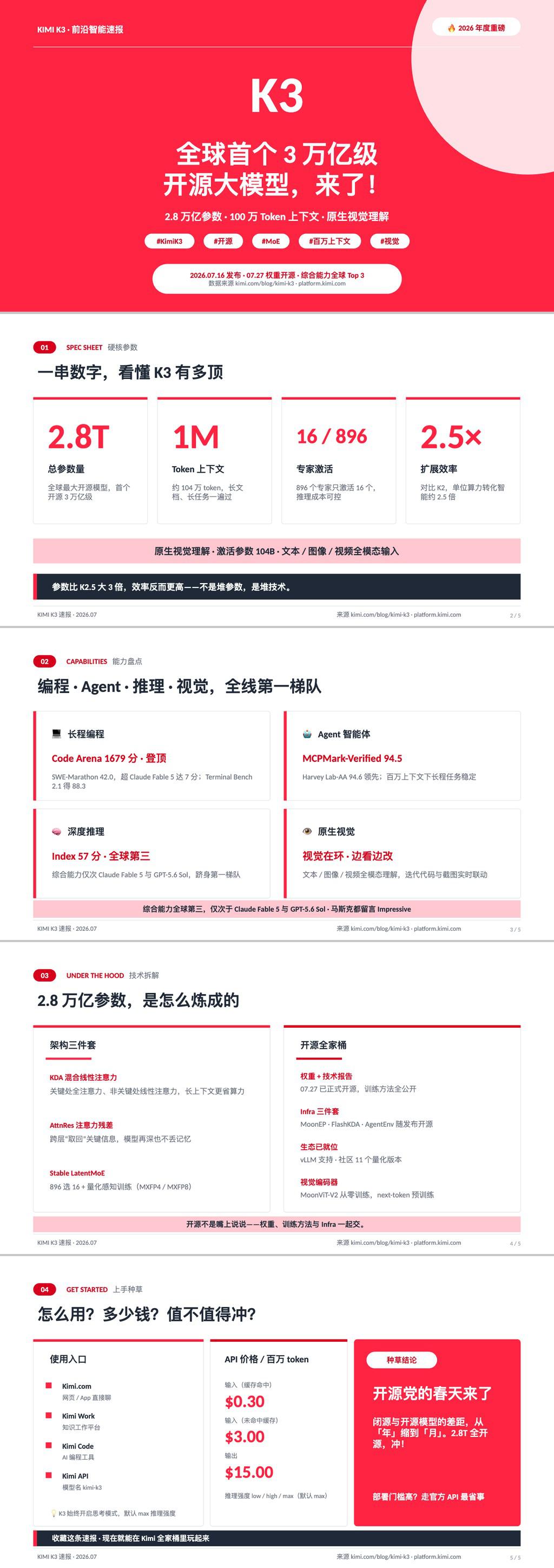
Please create a PPT project based on https://github.com/zythum/pptxgen-ts-starter.
Please create a middle-school Chinese language lesson deck on the classical Chinese poem “江雪” Use an ink-wash style and design it for a session of about 20 minutes. Include the lesson structure, key teaching points, and classroom interaction.
请基于 https://github.com/zythum/pptxgen-ts-starter
创建一个 PPT 作为中学语文课件。主题为“《江雪》古诗解析”,采用水墨风格,时长大概 20 分钟。请结合课文内容设计教学结构、讲解重点和课堂互动。

If you found it useful, I would be grateful if you could leave a star on the repository.
Thank you.