Basics and Navigation
Follow the guide here
Currently, we have a pre-commit hook which runs a gradle command called ktlintCheck. When you commit, this is ran & it checks formatting of the entire code and outputs the result as a xml file. To autofix this, do ./gradlew ktlintFormat in your terminal. Or open Gradle -> Tasks -> Formatting -> ktlintFormat. ktlintFormat sometimes can't fix everyting and you will have to lint the code yourself.
edu.rpi.shuttletracker is the package the app is installed under. In the android file system, apps are installed with this package name and apps with the same name will be updated when installed.
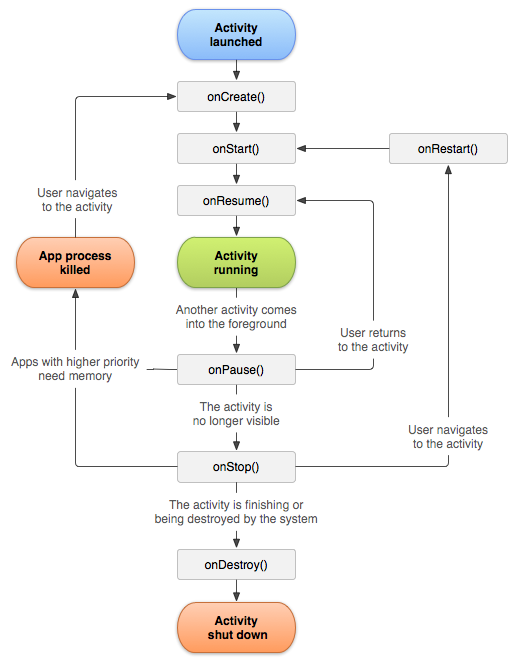
This is where the code starts when the app is opened
This is used for dependency injection. This gives us objects for network requests, databases, and user preferences without having to make duplicates. It ensures that those objects will always be singletons.
You can modify these to change the base information of these objects such as database name & network cache size.
This includes the app’s data layer, including network access, repositories, models, and user preferences.
This houses the API and how we interact with it. It uses retrofit to do post, get, ect. calls. These calls are then wrapped in a NetworkResponse to call the API without crashing if the user doesn't have interet, the server is down, or some other mistake. The first type of NetworkReponse is what the API would map to and ErrorResponse would be the response error.
There is then the files ApiHelper and ApiHelperImpl. ApiHelper is an interface of the methods the repository in ApiRepositoy would recieve. The implementation of ApiHelperImpl is to convert the data to the correct format. Such as getBuses() is calling the api every 5 seconds and giving the original caller the value
This folder contains shared data objects used across the app, such as Bus, Route, Schedule, Announcement, and analytics-related models. Most are Kotlin data classes and are shared between the network, repository, and UI layers.
This houses the repositories for the entire app. These files are how we access the backend.
This currently holds the repository for the API, database, and user preference
The user interface is split into seperate screens. Every different page that you see in the app, such as the map & settings page, will be put into a different file to stay organized.
The UI is written all using jetpack compose using a MVVM architecture. Jetpack compose is written to automatically update to changes in Kotlin's flows
An Activity is where a big UI feature starts from. This hosts the navigation information and all the screens are nested into this. This app is currently a 1 activity app so its always where the UI starts from.
MVVM means model, view, viewmodel. Each part has its own role which works together to create a working UI.
Models are classes that represent the UI. For example: the map needs all the buses and stops to be drawn onto the map. Therefore, the model stores a list of buses and stops.
The model is usually split into a UIState data class written on the bottom of the viewmodel file.
The view is the UI. This pulls data from the Model to display to the user. Whenever the user interacts with the view, such as clicking a button, it sends this information to the ViewModel. After that, it displays the new Model information.
The viewmodel is the mediator between the backend and the View. It has functions that the View can call to say something has changed, and it also tells the View when there has been a chage from the Model.
The viewmodel also has access to the backend. This is done by dependncy injection to get the repositories so it can retrieve the relavent information the View needs.
To store the model, it uses a private MutableStateFlow and a public StateFlow. The StateFlow coppies the data from the mutable one and is exposed to the UI. This ensures that the UI can't accidently change the Models information. To modify the model, you modify the MutableStateFlow
Services run long term and do various tasks that do not require UI.
This sends firebase tokens for the user to the server using onNewToken. It is also where it retrieves notifications from firebase in which it callsonMessageReceived.
The notification file is to create all of the channels and groups for sending notifications. Each group would consit of notifcations of similar content. Inside each group, it would have channels which would be the specific thing you are sending information about. Each channel should have a unique ID.
This is where static resources are stored. Such as the app icon, strings, and other images that won't change.
In here, there is a file called strings. Before pushing an update, its good practice to move all strings that you use into this file.
This is used to manage and build your project. This lets you add new external libraries and configure how you distribute the app. Before releasing a new update, Ensure you up the version code and name in the module file.
All the external libraries will be put in libs.version.toml