feat(tabs): 标签页分屏查看(左右并排对照两个脚本/数据表) - #7109
Conversation


Add a read-only reference pane next to the main content area so two
scripts or two tables can be viewed at the same time. Right-click a
non-active tab and choose "Open in split view"; the pane supports
scrolling, text selection and copy, and its SQL editor suppresses
execute/save/format shortcuts. A "Set as main pane" action promotes
the reference tab back to the main editing pane, and clicking the tab
in the tab bar does the same.

The split pane tab id is persisted with the open-tabs state (dropped
when its tab is missing), excluded from result-cache eviction, and
cleared whenever its tab is closed or activated. Pane width is
drag-resizable and remembered in localStorage.

Closes t8y2#6910
 github-actions
Bot
added
area/desktop
github-actions
Bot
added
area/desktop
Pagination, sorting, refresh and grid execute actions in the split
pane now route through a second useDataGridActions instance bound to
the reference tab, so two tables can be browsed side by side. The bare
reload fallback stays tab-scoped for non-active tabs instead of
executing the main pane's active tab.

# Conflicts:
#	apps/desktop/src/components/editor/QueryEditor.vue

|
- Split reference pane can now stack below the main pane (top/bottom) in
  addition to side-by-side; direction persists with the open-tabs state
- Divider drag maps to width or height depending on the layout
- Mod+D opens/toggles the side-by-side split, Shift+Mod+D the top/bottom
  split; both pick the most recently used other tab as the reference
- Tab context menu gains a top/bottom split entry; shortcut labels in
  settings and all 8 locales

|
Hi eryajf,感谢 review!三个问题已全部处理: 1. 截图 & GIF详见下方 GIF 演示,完整截图也在 PR 描述里。
2. 上下分屏已实现。右键标签有两个入口:「在分屏中查看(左右并排)」和「在上下分屏中查看(上下堆叠)」。上下布局下分隔条变成水平方向的行分隔条,可拖拽调整高度(20%–80%),方向随 open_tabs 状态一起持久化。
3. 快捷键
两个快捷键都注册在全局 scope,可在「设置 → 键盘快捷键」里自定义修改。无已有分屏时自动选择最近使用的其他标签页作为参照页。 如果还需要其他功能或细节调整,随时告诉我。 |
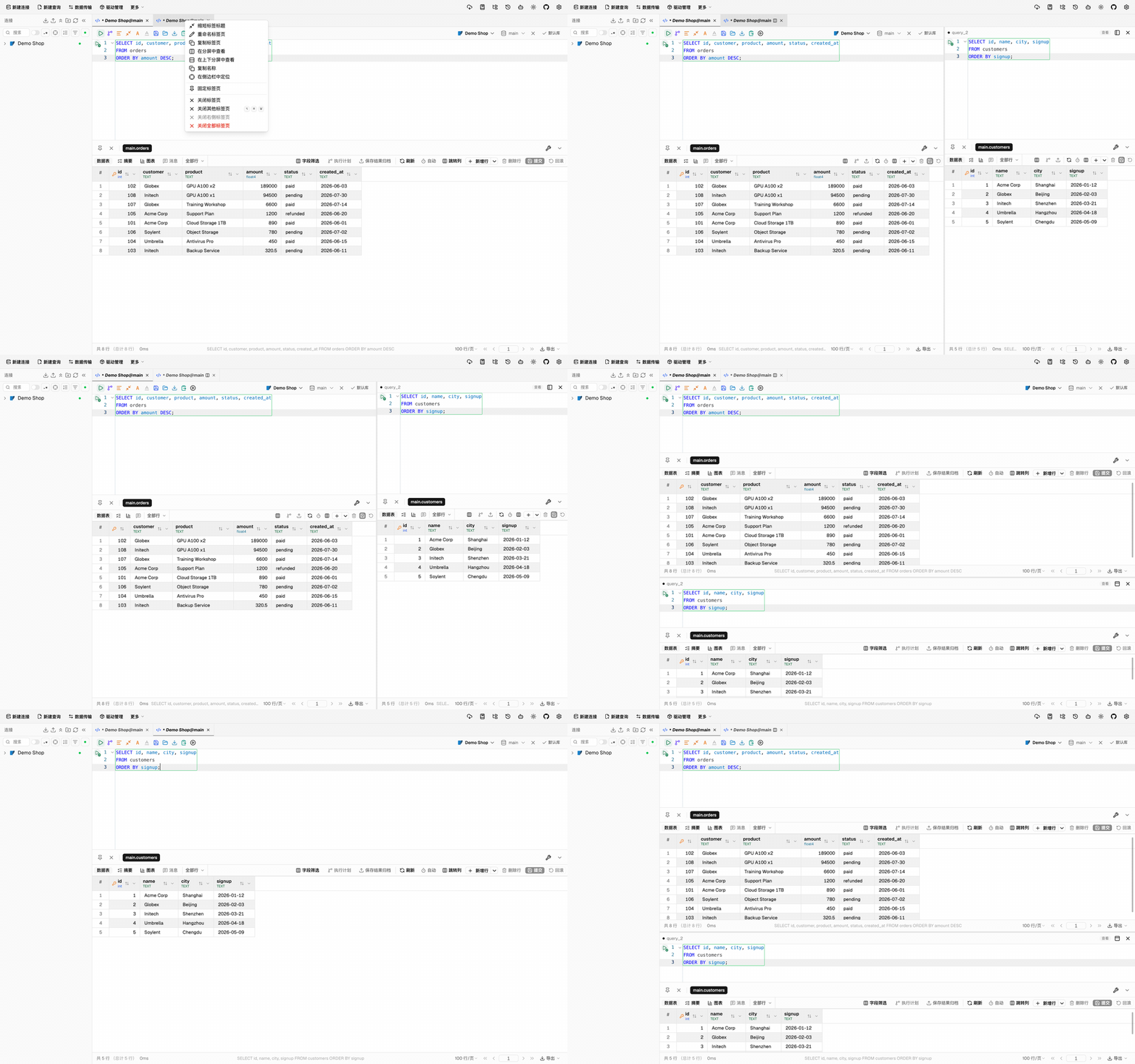
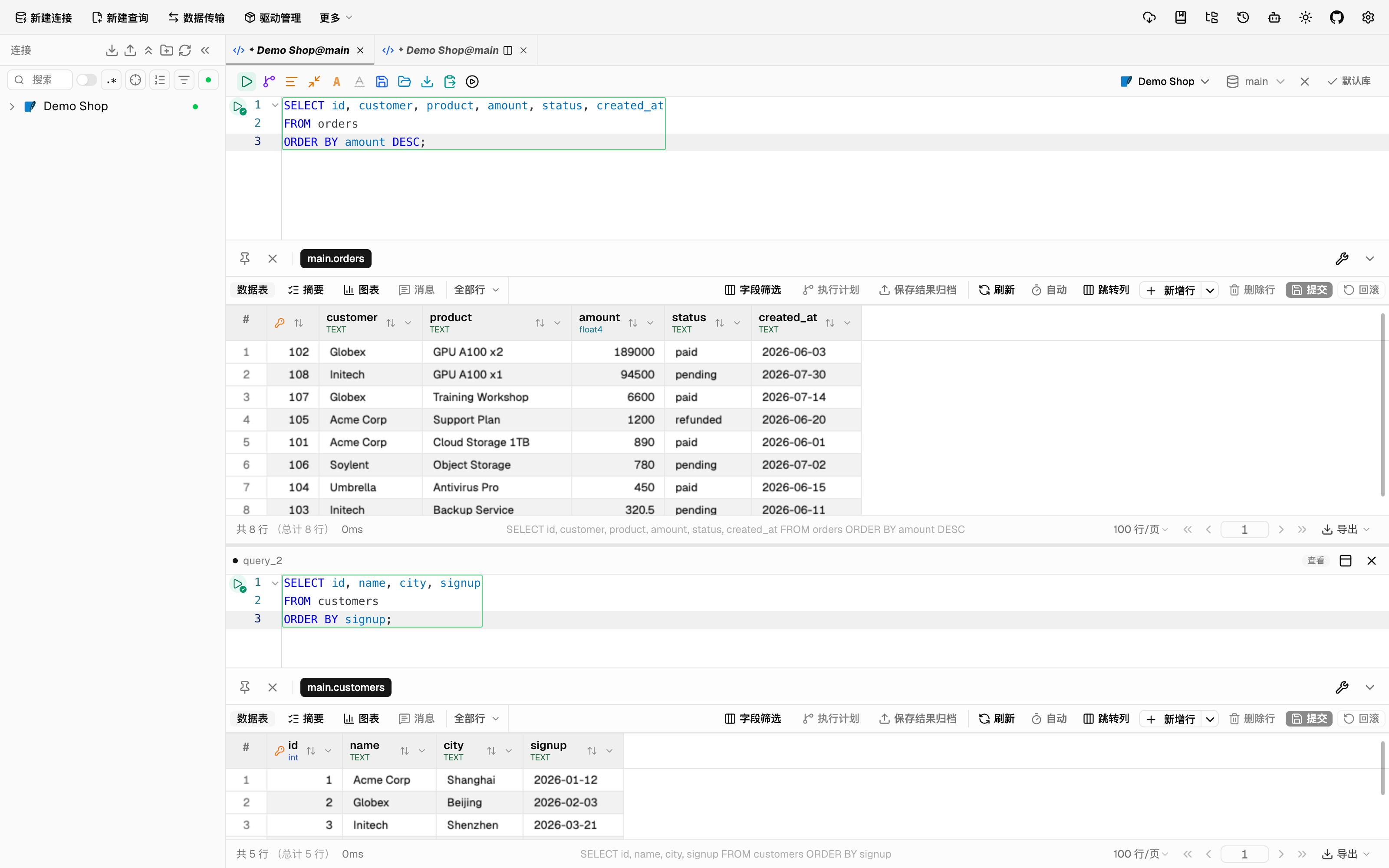
|
我突然想到,cmd+d当前在编辑区域默认应该是向下复制行,所以似乎有一些冲突(虽然都支持自定义,但是默认值好像也有点冲突?) |
|
我比较喜欢的Ghostty上就是: |

 t8y2
left a comment
t8y2
left a comment
t8y2
left a comment
There was a problem hiding this comment.
Request changes —— pane 架构本身是对的(状态收敛在 queryStore、同标签双窗格互斥、持久化带失效校验、测试和 8 语言完整),但当前有三件事需要作者处理,其中 rebase 是语义性的,不适合代解:
- Rebase 冲突是语义性的:App.vue 里重排缩进的模板块,main 之后在块内新增了
@execute-pointer-down/ 带参@execute、Oracle 事务指示 props 和 zen mode 接线。手工解冲突若从 PR 的旧副本出发会静默回归执行快照与 Oracle 事务 UI。冲突共 4 个文件(App.vue、QueryEditor.vue、AppTabBar.vue、useDataGridActions.spec.ts)。另外请定义分屏在 zen mode 下的行为(当前参照窗格会在 zen 布局里照常渲染)。 - 只读保证有洞:
{ ...connection, read_only: true }克隆保留了真实 connection id——该连接存在 write-unlock 会话时connectionIsEffectivelyReadOnly返回 false,参照窗格的控制台/网格会变回可编辑;且 ContentArea 的activeResultConnection在设置activeResultExecutionTarget时直接从 store 重读配置、绕过克隆。建议参照窗格的只读判定显式强制(独立 forcedReadOnly 传入路径),不依赖克隆对象。 - 参照窗格存在死控件:split ContentArea 只接了 reload/paginate/sort/execute-sql,
@save-sql、@structure-editor-saved、@click-table等未绑定——结构编辑器的保存按钮在参照窗格里点了没反应;format/compress request信号与主窗格共享,主窗格格式化会同时打到参照编辑器。建议 view-only 模式下隐藏/禁用这些动作,或明确接线。
处理完(尤其冲突解决后请补一轮 typecheck + 针对 App.vue 接线的最小组件测试)我很乐意再 review。
920dc7c to
c4cdcbc
Compare
Merge upstream/main (v0.6.0): tab bar position/grouping, Oracle manual
transaction indicators, zen mode, replace/SQL shortcut machinery — taking
main's semantic wiring (execute-pointer-down, parameterized execute,
preview-changes) and re-applying split-pane structure on top.

Review fixes:
- forcedReadOnly prop on ContentArea checked before every editing entry
  point (both grids, Nacos/MQ/Nacos-config consoles); split pane passes it
  explicitly so an active write-unlock session on the real connection can
  no longer make reference-pane grids editable through store re-reads
- TableStructureEditor gains readOnly presentation: footer save actions
  hidden, applyChanges rejected, Mod+S guarded — no more dead save button
  in the reference pane
- Wire the reference pane's remaining controls: cancel routes to the split
  tab's own execution, AI fix/selection routes to the global AI panel,
  object navigation (click-table/view-data/view-ddl/edit-structure/
  open-source/open-table/schema-change) routes to the main pane, structure
  editor close closes the reference view
- Pass null format/compress requests to the split pane so the shared
  signals can never reach the reference editor
- SQL shortcut keymap and DOM handler disabled under viewOnly
- Zen mode: split pane intentionally stays mounted (documented)
- Add ContentArea.splitPaneReadOnly.spec.ts guarding the wiring
|
感谢详细的 review,三个问题都已处理(commit 2c603b5): 1. Rebase 冲突已合并最新 main(v0.6.0)并按语义解决全部 5 个冲突文件。App.vue 的模板块以 main 为基准,保留了 按建议补了接线守卫测试 2. 只读保证不再依赖克隆对象。ContentArea 新增 3. 死控件
关于 Cmd+D 与复制行补充调研:VS Code 的 Cmd+D 是多光标选中、分屏是 Cmd+\;JetBrains 系 Ctrl+D 默认复制行且分屏无默认键;iTerm2/Ghostty 用 Cmd+D / Cmd+Shift+D 分屏。当前实现的解析顺序与 VS Code 的上下文相关键位一致:编辑器聚焦时 Cmd+D 走 duplicateLine(编辑器 scope 的 keymap 先于全局 handler 且 preventDefault),焦点在表格/侧栏等非编辑器区域时走分屏。若认为默认值仍易混淆,duplicateLine 可在设置里改键,或我们可以把 splitTab 默认改为 Cmd+\(VS Code 语义)——倾向听维护者的定夺。 |
3 participants


改动
实现 #6910:标签页分屏,可并排同时查看两个脚本或两张表。
useDataGridActions以参照标签实例化第二份),两张表可并排各自翻页对照;数据编辑仍保持只读Cmd+D(macOS)/Ctrl+D(Win/Linux)打开或关闭左右分屏;Cmd+Shift+D/Ctrl+Shift+D打开或关闭上下分屏。无已存在分屏时自动选择最近使用的其他标签页;分屏打开时再按同一快捷键切换方向,再次按下则关闭。快捷键可在设置里自定义演示
右键标签菜单(左右分屏 + 上下分屏两个入口):
左右并排分屏(参照窗格在右侧):
上下堆叠分屏(Cmd+Shift+D 切换):
拖拽分隔条调整宽度:
设计说明
主内容区的事件接线(执行、保存、重载等 30+ 事件)都绑定在唯一的 active tab 上。为避免大改接线层引入回归,v1 将参照窗格定位为只读参照面:浏览类操作(分页/排序/刷新)已按标签 id 路由可直接交互,数据编辑与 SQL 修改要切回主窗格。若后续需要双窗格同时可编辑,可在此基础上逐步把接线改为按标签 id 路由。
验证
pnpm typecheckpnpm lint(0 错误)pnpm exec vitest run apps/desktop/src/stores/__tests__/queryStore.splitPane.spec.ts apps/desktop/src/lib/__tests__/app/openTabsPersistence.spec.ts apps/desktop/src/composables/__tests__/usePaneResize.spec.ts(27 tests)pnpm test:13 个失败文件均为本分支基线(upstream/main 最新)上已存在的环境性失败(DataGridSurfaces / Mqtt* / Meilisearch* / keyboardShortcuts / settingsStore / canvasDataGridRenderer 等,已用 stash 在干净基线上复现),与本 PR 无关Closes #6910