
English | 简体中文 | 繁體中文 | العربية | Portuguese | Українська | ภาษาไทย | فارسی | Italiano | Azərbaycanca | Русский | Српски | 日本語 | Indonesia | हिंदी | বাংলা











-
Download videos and audio files from video platforms supported by yt-dlp (formerly youtube-dl).
-
Embed metadata and video thumbnail into extracted audio files supported by mutagen.
-
Download all videos in the playlist with one click.
-
Use embedded aria2c as external downloader for all your downloads.
-
Embed subtitles into the downloaded videos.
-
Execute custom yt-dlp commands with templates.
-
Manage in-app downloads and custom command templates.
-
Easy to use and user-friendly.
-
Material Design 3 style UI, with dynamic color theme.
-
MAD: UI and logic written with pure Kotlin. Single activity, no fragments, only composable destinations.
For most devices, it is recommended to install the arm64-v8a version of the apks
-
Download the latest stable version from GitHub releases
- Install the pre-release versions to help us test out new features & changes
-
Stable releases are also available on F-Droid
Join our Telegram Channel or Matrix Space for discussion, announcements, and releases!


Seal will be always free and open source for everyone. If you like it, please consider sponsoring me!
Contributions are welcome!
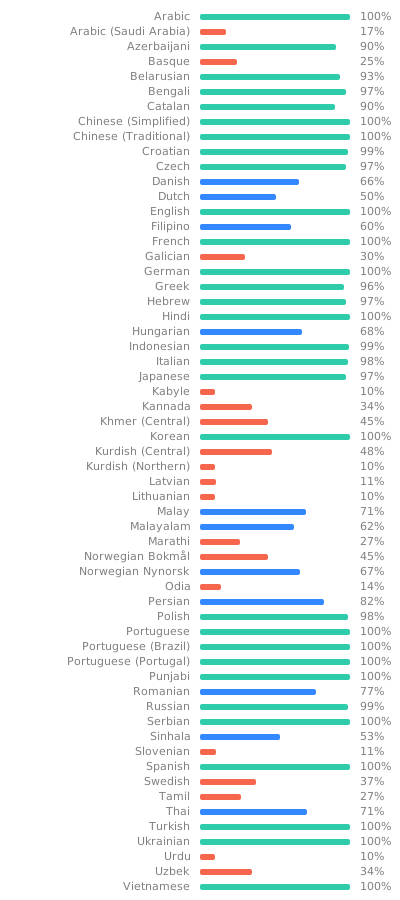
You can help translate Seal on Hosted Weblate.
Note
For submitting bug reports, feature requests, questions, or any other ideas to improve, please read CONTRIBUTING.md for instructions and guidelines first.
Seal is a simple GUI of yt-dlp, based on youtubedl-android
Some of the UI designs and codes are borrowed from Read You and Music You

Warning
Except for the source code licensed under the GPLv3 license, all other parties are prohibited from using Seal's name as a downloader app, and the same is true for Seal's derivatives. Derivatives include but are not limited to forks and unofficial builds.
Important
This is a fork-specific change and is not part of upstream Seal.
To help diagnose stability problems — in particular a UI freeze / ANR (Application Not Responding) that can occur during heavy "copy link → switch app → paste → download" workflows — this build integrates Sentry for automatic crash, ANR, and diagnostic reporting.
What gets collected and sent
- Crashes (unhandled exceptions and native/NDK crashes) and ANRs, including the OS thread dump and a stack-profile (flamegraph) of the main thread at the time of an ANR.
- Breadcrumbs: a trail of recent app events leading up to an issue, including the app's own
Log.*messages, activity/app lifecycle, and system events. - Performance traces for database and file I/O operations (used to pinpoint slow work on the main thread).
- A screenshot and a view-hierarchy snapshot captured at the moment an error occurs.
- Device & app context: model, manufacturer, OS version, ABI, app version, memory/battery/ storage/connectivity state, and the bundled yt-dlp version.
- Because detailed debugging was the goal,
sendDefaultPiiis enabled, which means events may also include data such as your IP address and device name. Screenshots/view hierarchies can contain whatever is on screen at the time (e.g. a URL you were downloading).
Where it goes: the collabs-with-kushal organization's seal project on Sentry's EU servers.
Offline behavior: every event is written to the app's cache first, then sent. If the device is offline when a crash/ANR happens, the report is stored on disk and delivered automatically on the next launch or when connectivity returns — so reports are not lost.
Builds without telemetry: the F-Droid flavor (fdroid) ships with the Sentry DSN blanked
out, so Sentry is never initialized and nothing is collected or sent there.
How to disable it entirely: build the fdroid flavor, or set the SENTRY_DSN value in
app/build.gradle.kts to "" (App.kt skips initialization when the DSN is blank). The on-device
crash screen continues to work either way.
Disabling just the ANR main-thread profiler: set the
io.sentry.anr.profiling.sample-rate meta-data in app/src/main/AndroidManifest.xml to 0.0.