

Flexible TypeScript tooling for developing, debugging, and visualizing AI agents and workflows.
Agent Dev Lab (ADL) is a TypeScript-first framework for experimenting with agentic workflows. It pairs a headless core library built on top of Vercel's AI SDK with optional sandboxed tools, an inspection UI, and a CLI — so you can author agents and workflows as plain TypeScript, run them from scripts, tests, or a server, and inspect the resulting telemetry.
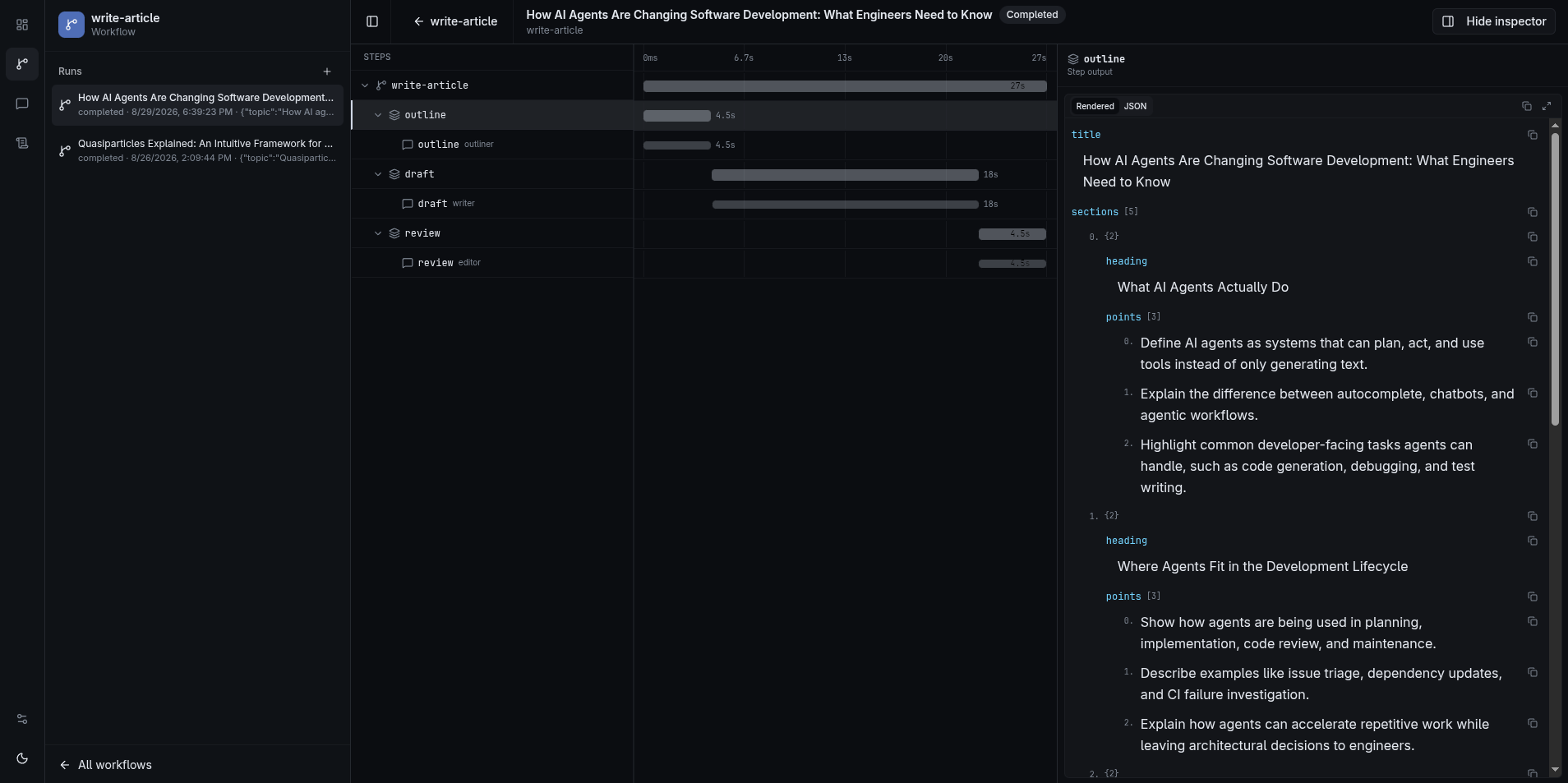
The inspection UI (adl dashboard): a workflow run's waterfall, step-by-step.
- Runtime/UI split — workflows run from scripts, tests, or a server; the UI reads persisted output.
- TypeScript-first — plain TS orchestration (
if/for/try/await/Promise.all), no workflow graph DSL. - AI SDK native —
ModelMessage,streamText, andtool()without parallel abstractions. - Colocated prompts — markdown beside code; templates via
createTemplate.
Works with npm and Node 22+, or Bun — no Bun requirement to use ADL in your own project.
bunx @agent-dev-lab/cli@latest init my-research
# or: npx @agent-dev-lab/cli@latest init my-research
cd my-research
bun install
# or: npm install
cp .env.example .env   # then set OPENAI_API_KEY
bunx adl workflow run demo-counter --input '{"steps":3}'
bunx adl workflow run ask --input '{"question":"What is Agent Dev Lab?"}'
bunx adl agent run assistant --input "What is Agent Dev Lab?"
bunx adl dashboard      # inspection UI
# or with npm: npx adl ...
Or add the packages to an existing project (still need adl.config.ts, src/adl.ts, and .env):
bun add @agent-dev-lab/core @agent-dev-lab/cli @agent-dev-lab/web ai @ai-sdk/openai @ai-sdk/otel
# optional sandboxed file/bash/fetchUrl tools:
# bun add @agent-dev-lab/tools
# or: npm install @agent-dev-lab/core @agent-dev-lab/cli @agent-dev-lab/web ai @ai-sdk/openai @ai-sdk/otel
cp .env.example .env # or create one with OPENAI_API_KEYADL loads .env files from the project root (the directory with adl.config.*), the same way Next.js does — including .env.local and .env.[mode]. Existing process environment values are not overwritten. This applies to adl dashboard, adl workflow run, and bun run dev:web (playground .env).
| Variable | Purpose |
|---|---|
OPENAI_API_KEY |
Provider key for the sample agent (@ai-sdk/openai) |
ADL_SQLITE_PATH |
SQLite file (default .data/agent-dev-lab.sqlite under the project root) |
ADL_PROJECT_ROOT |
Override project discovery for CLI / UI |
DEBUG=adl |
Print CLI stack traces |
Model selection isn't a framework-level env var — it's ordinary code where you build the model (see Project Setup for how the adl init scaffold wires this up, if that's the path you're on).
Author a runtime, an agent, and a workflow as plain TypeScript:
import { createAdlRuntime, sqliteMessageStore, sqliteWorkflowStore } from "@agent-dev-lab/core";
import { openai } from "@ai-sdk/openai";

export const adl = createAdlRuntime({
  defaults: { model: openai("gpt-4o-mini") },
  stores: {
    message: sqliteMessageStore(),
    workflow: sqliteWorkflowStore(),
  },
});

const researcher = adl.createAgent({
  id: "researcher",
  model: openai("gpt-4o"),
  systemPrompt: "You are a research assistant.",
});

const review = adl.createWorkflow({
  id: "literature-review",
  run: async (input: { topic: string }, ctx) => {
    await ctx.step("research", async ({ ctx: child }) => {
      await researcher.run({
        memoryScope: child.memoryScopeWithSuffix("notes"),
        user: input.topic,
      }).result;
    });
    return { topic: input.topic };
  },
});

const handle = review.run({ topic: "CRISPR delivery" });
await handle.result;
An ADL project is any directory with an adl.config.* file at its root — the single discovery surface for the CLI, inspection UI, and loadAdlProject(). See Project Setup for the recommended layout and the #adl import alias.
Working on the framework itself (this monorepo, as opposed to a project built with ADL). Requires Bun 1.4.2 (declared in the root packageManager field) — Bun is not required to use ADL in your own project, see Getting started.
bun install
bun run dev:docs   # docs site on :4321
bun run dev:web    # inspection UI (Vite)
No external services are required. Put LLM provider keys in the playground (or your project) .env when you want to execute agents.
All standard scripts live in the root package.json and run through Turbo:
| Command | Description |
|---|---|
bun install |
Install dependencies |
bun run dev |
Run web + docs in parallel |
bun run dev:web |
Framework UI dev against apps/playground |
bun run dev:cli |
adl dashboard using the nearest user project from cwd |
bun run dev:docs |
Docs site on port 4321 |
bun run build |
Build all packages |
bun run lint |
ESLint across all packages |
bun run typecheck |
TypeScript checking via Turbo |
bun run test |
Run package tests via Turbo (core, tools, cli, web) |
bun run format |
Prettier write across the repo |
bun run format:check |
Prettier check (used in CI) |
Bun + Turborepo monorepo.
| Package | Path | Role |
|---|---|---|
@agent-dev-lab/core |
packages/core |
Headless runtime — agents, workflows, templates, stores; also ./db, ./eslint, ./tsconfig/node.json |
@agent-dev-lab/tools |
packages/tools |
Optional sandboxed file, bash, search, and fetchUrl tools (policy + executor pool) |
@agent-dev-lab/web |
apps/web |
TanStack Start (React 19) inspection UI — port 3000 |
@agent-dev-lab/cli |
apps/cli |
Stricli CLI (adl) |
@agent-dev-lab/docs |
apps/docs |
Astro Starlight guides + TypeDoc API reference — port 4321 |
@agent-dev-lab/playground |
apps/playground |
Sample ADL project (adl.config.ts) for framework dev |
Full documentation is hosted at agent-dev-lab.com.
- Overview — high-level orientation
- Project Setup — the recommended way to start a project (
adl init) - Manual Setup — adding ADL to an existing project by hand
- Sandboxed tools — optional
@agent-dev-lab/tools(file, bash, search,fetchUrl) - Tool providers —
ToolProvider,dispose/onRunEnd, per-call context - Inspection UI —
adl dashboard, waterfalls, agent conversations - Gotchas — sharp edges worth knowing about before they surprise you
- Runtime —
createAdlRuntime, workflow context, OpenTelemetry - Agents —
adl.createAgent,stopWhen,adl agent run - Workflows —
adl.createWorkflow,ctx.emit,createWorkflowFromAgent - Project Config — registry,
loadAdlProject
MIT © J. Simon Richard