A markdown viewer for Unity
UMV is a Unity editor extension for displaying markdown files in the inspector window and a dedicated editor window.
It should just work without any setup or configuration.
Clone the repository into the project Packages directory
cd Packages
git clone https://github.com/gwaredd/UnityMarkdownViewer.git
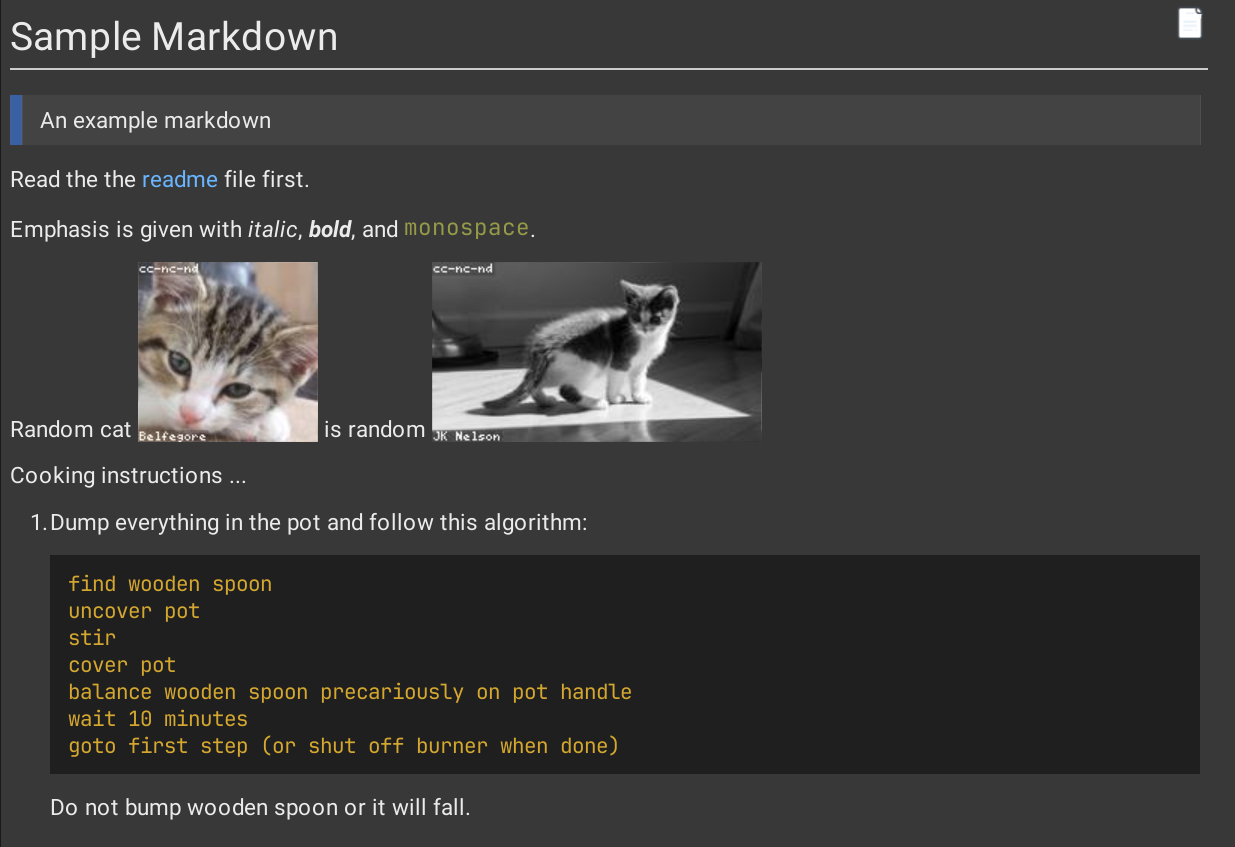
Selecting any .md or .markdown file in the Project window renders it in the Inspector automatically.
Open the dedicated viewer via Window → Markdown Viewer Window. The window:
- Displays the currently selected markdown file.
- Stays in sync with Project window selection when Sync Selection is enabled in the toolbar.
- Auto-reloads when the file changes on disk.
- Accepts drag and drop of markdown files when no file is loaded.
- Can be pinned to any layout position like any other editor window.
Right-clicking a .md or .markdown file in the Project window shows an Assets → Markdown submenu (greyed out for non-markdown files):
| Item | Action |
|---|---|
| Markdown → Open | Opens the file in the Markdown Viewer Window |
| Markdown → Edit | Opens the file in the external editor registered with the OS for that file type |
| Markdown → Create | Creates a new markdown file in the selected folder |
A new markdown file can also be created via Assets → Create → Markdown.
By default, double-clicking a markdown file opens it in the Markdown Viewer Window. This can be changed in preferences so that double-clicking falls through to the external editor instead (see Preferences below).
Open Edit → Preferences → Markdown (or Unity → Preferences → Markdown on macOS) to configure:
| Setting | Description |
|---|---|
| Open files in editor | When enabled (default), double-clicking a .md/.markdown file opens the Markdown Viewer Window. Disable to use the external editor on double-click instead. |
| Dark Skin | Toggle between light and dark rendering. Defaults to match the current Unity editor skin. |
| Strip HTML | Strip raw HTML tags from rendered output. |
| JIRA URL | Base URL for JIRA issue links (e.g. https://yourproject.atlassian.net/browse/). |