Repository navigation
Add Suggestion mode with Notes #73411

Description

Start here
Two ways in, depending on why you're here:
- Want to try it? Jump to Testing - it runs in Playground, nothing to install.
- Here to review the code? Jump to Reviewing the stack - start at the bottom, Suggest mode 1/9: editor intent (edit/suggest/view) and experiment gate #80427.
What problem does this address?
As Notes evolve beyond simple block-level comments, this enhancement adds support for suggested edits that can be applied directly to the content. This is similar to the "Suggesting" workflow in Google Docs, where reviewers propose changes and authors can accept or reject them.
While this started as a Notes concept, it is more broadly an editorial workflow / content editing concept that overlaps with how Notes work.
What is the solution?
In Suggest mode, edits are not applied to the content directly. Instead they are captured as suggestions rendered in context, which the post author can accept or reject. There are two kinds of suggestion:
- Inline text suggestions - typing, deletion, cut, paste, and formatting (bold / italic / link) toggles within rich text.
- Structural suggestions - block-level changes such as inserting, removing, or moving blocks, and attribute changes like heading level or alignment.
Design: inline suggestions are markers, by construction
Every inline edit becomes a <mark class="wp-suggestion"> marker by construction, so no edit falls back to a separate overlay diff render. This follows the Google Docs model - the text shows once and is styled in place, rather than showing paired <del>/<ins> runs.
- Text edits - typing, word/line deletion, cut, and single-line paste are caught on
beforeinput/cut/pasteby the suggestion keyboards, which write markers directly. The remainingonChangeseams (committed IME composition, autocorrect, drag-drop, multi-line paste) are diffed into markers by a singleton content reconciler. - Formatting - bold / italic / link toggles become a single
format-type marker wrapping the run.
The result is a single accept/reject path and a single serialization. An attribute-only revert shim on the overlay remains only for structural attribute changes (heading level, alignment); it never touches inline text or formatting.
A safety-net e2e asserts the invariant directly: a block never carries both an inline marker and an overlay diff.
Testing
#78994 bundles all nine layers into one branch and builds it in Playground, so there is nothing to install. It is also the one place the feature is enabled by default - everywhere else it sits behind an experiment, off until you turn it on:

https://playground.wordpress.net/gutenberg.html?pr=78994
Setup: none. Open a post with a few paragraphs and look for Options (⋮) > Mode. A multi-paragraph post matters - some of the input handling only shows up once there is more than one block.
(If you are testing one of the stack PRs instead of #78994, enable Settings > Experiments > Collaboration > Suggestion Mode first. #78994 is the only branch that skips that step.)
1. Switching modes
- Options (⋮) > Mode offers Editing, Suggesting, and Viewing. Switching announces itself with a snackbar ("You're suggesting").
- Viewing is read-only: you can select and scroll, but not type.
- Keyboard shortcuts follow the Google Docs convention:
⇧⌥⌘Z/⇧⌥⌘X/⇧⌥⌘Con Mac,Ctrl+Shift+Altwith the same letters elsewhere. They register wherever Suggest mode is available. - Reload the editor - the mode returns to Editing. It is session-scoped on purpose and never persisted.
Switch to Suggesting for everything below.
2. Inline text suggestions
- Type in the middle of a paragraph → the new text appears as an underlined add marker, and one "Add: …" note appears in the sidebar (not "Format:").
- Delete three ways: select text and press Delete; press Backspace at a caret (repeating grows one marker rather than one per keystroke); use word-delete (Option/Ctrl+Backspace). Each becomes a struck-through del marker - the text stays until accepted.
- Cut (Cmd/Ctrl+X) a selection → del marker, and the clipboard still receives the cut text.
- Type over a selection → a del + add pair (two notes).
- Paste a single line → one add marker. Paste multiple lines → captured as a whole-attribute suggestion, never a raw commit.
- Autocorrect / spellcheck replace / IME commit → reconciled into add/del markers.
- Grapheme safety: backspace over emoji/ZWJ sequences (👨👩👧, flags) marks whole graphemes.
- Edits that straddle an existing marker are left alone rather than corrupting another suggestion.
3. Formatting suggestions
- Select a run and toggle bold / italic / link → the run is wrapped in a single format marker (dotted underline, no duplicated text). The note records the original so Reject can restore it.
4. Structural suggestions
- Insert a block and type into it → ONE "Insert block" note (no extra "Add" note); the block carries the pending-insert treatment. An empty inserted block does not suggest anything until it has content.
- Delete a block → it stays visible with a struck-through pending-remove treatment.
- Move a block up/down → it lands at the proposed position with a pending-move treatment and a non-interactive ghost marks its origin. Moving the same block twice keeps a single note.
- Change an attribute (heading level via the block switcher, alignment) → captured as an attribute suggestion.
5. Notes sidebar
- Every suggestion appears as a note with a Docs-style summary ("Add:", "Delete:", "Format:", "Insert block:", "Move block:", "Remove block:").
- If a non-notes sidebar (eg. post/block settings) is open when a suggestion is created, it switches to All notes automatically so the note is immediately visible; a closed sidebar stays closed.
- With multiple suggesters, markers and pending treatments are tinted per author, taken from their avatar color.
6. Undo
- Undo a just-typed addition → the marker and its note both go away.
- Same for a deletion, a type-over (both notes go), a format change, and each structural type.
- Make several suggestions and undo repeatedly → they withdraw newest-first. Redo must not crash.
7. Persistence and saving
- Save draft stays available while suggestions are pending (structural pending state saves into content and is hidden from the front end at render time).
- After saving, there is no "unsaved changes" browser warning.
- Reload the post → inline markers, pending structural treatments (including the move ghost), and their notes all survive, and can still be accepted or rejected.
8. Review cycle (as the author, in Editing intent)
- Accept one of each kind: addition (text kept, marker unwrapped), deletion (text removed), format (proposed formatting kept), insert (block kept), remove (block removed), move (new order kept, ghost cleared), attribute (change lands in content).
- Reject one of each kind: the content reverts exactly (a rejected move restores the original order, including after a reload).
- Accepting or rejecting shows a "Suggestion applied." / "Suggestion rejected." snackbar.
- Front end: publish/preview with pending suggestions → proposed additions and inserted blocks never render until accepted; pending deletions and format runs still render their real text.
If you hit something that does not match the above, please note which step and which mode you were in - that narrows it down a lot.
Reviewing the stack
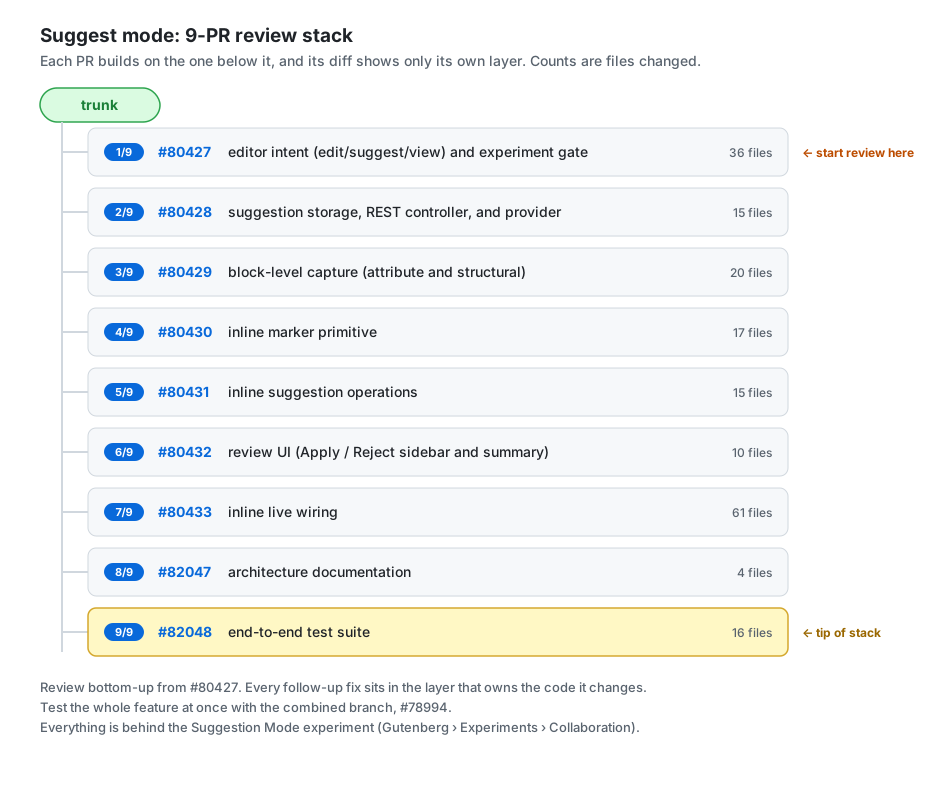
- Suggest mode 1/9: editor intent (edit/suggest/view) and experiment gate #80427 - editor intent + experiment gate (36 files)
- Suggest mode 2/9: suggestion storage, REST controller, and provider #80428 - suggestion storage, REST controller, provider (15 files)
- Suggest mode 3/9: block-level capture (attribute and structural) #80429 - block-level capture, attribute and structural (20 files)
- Suggest mode 4/9: inline marker primitive #80430 - inline marker primitive (17 files)
- Suggest mode 5/9: inline suggestion operations #80431 - inline suggestion operations (15 files)
- Suggest mode 6/9: review UI (Apply / Reject sidebar and summary) #80432 - review UI, Apply / Reject sidebar and summary (10 files)
- Suggest mode 7/9: inline live wiring #80433 - inline live wiring (61 files)
- Suggest mode 8/9: architecture documentation #82047 - architecture documentation (4 files)
- Suggest mode 9/9: end-to-end test suite #82048 - end-to-end test suite (16 files)
How to review this
Start at the bottom and work up. Each PR targets the one below it rather than trunk, so its diff shows only its own layer. Reading #80427 first and moving up means you never see the same code twice, and each layer arrives with its dependencies already in place.
Review each PR against its own base. GitHub's diff already does this - resist comparing against trunk, which will show you the whole feature every time.
Leave comments on the PR that owns the code. If something in #80431 looks wrong because of a decision made in #80429, the comment belongs on #80429.
A few files are deliberately split across layers, so they look incomplete when you first meet them:
with-suggestion-overlay.tsx- lands in Suggest mode 3/9: block-level capture (attribute and structural) #80429 with attribute and structural capture; Suggest mode 7/9: inline live wiring #80433 restores the inline handoff.provider.ts- lands in Suggest mode 2/9: suggestion storage, REST controller, and provider #80428 with attribute/structural apply and reject; Suggest mode 7/9: inline live wiring #80433 restores the inline apply/reject.store-interceptor.ts- lands in Suggest mode 3/9: block-level capture (attribute and structural) #80429; Suggest mode 7/9: inline live wiring #80433 adds the inline content-edit planning.lib/compat/wordpress-7.1/block-suggestions.php- meta registration in Suggest mode 2/9: suggestion storage, REST controller, and provider #80428, the structural strip in Suggest mode 3/9: block-level capture (attribute and structural) #80429, the inline marker strip in Suggest mode 7/9: inline live wiring #80433.
Everything else is whole in exactly one PR.
Follow up fixes live in the layer that owns the code. The review round that produced #81655-#81695 originally merged everything onto the top of the stack, which left #80433 at 115 files and put fixes to List View, post status and the intent switcher three layers above the code they change. Those now sit in their own layer, and the documentation and the end-to-end suite have their own PRs, so each layer reviews as one kind of thing.
If you only have time for a slice: #80429 (block-level capture) and #80431 (inline suggestion operations) hold most of the interesting logic. #80427 is the smallest and a good place to sanity-check the gating approach.
Test while you review - #78994 builds the tip of the stack, so the Testing walkthrough above exercises exactly the code you are reading. Its only departure is that it turns the feature on by default; the experiment gate itself is reviewed on #80427.
Architecture write-up: docs/explanations/architecture/suggestions.md.
Automated coverage
- Unit: the
suggestion-mode,inline-suggestions(diff/plan engines),inline-markers, andattribute-suggestionssuites. - E2E: 64 tests -
suggestion-mode.spec.jsgolden paths (22),suggestion-mode-review.spec.jsreview cycle (19),suggestion-mode-undo.spec.js(9),suggestion-mode-overlay-retirement.spec.jssafety net (8: the invariant plus the word-delete / cut / multi-line-paste / autocorrect / IME seams), andsuggestion-mode-persistence.spec.js(6: save/reload round-trips and the front-end strip). - PHP: the front-end strips are covered by the
strip-inline-suggestion-markersandstrip-pending-structural-suggestionsphpunit tests.
Superseded earlier stacks
The feature was originally prototyped across a larger multi-workstream stack (#77403, #77404, #77405, #77406, #78351, #78352, #78353, #78308, #77967, #77968, #77970, #77971, #77973, #77978, #77979, #78412, #79282) plus the combined testing branch (#78994). A visual stack diagram of the original layout is in this comment.
That work was then consolidated into a manually stacked two-PR series - #79713 (core subsystem + experiment gate) and #79714 (inline markers; #79752, overlay retirement, was folded into it). Those two PRs are now closed, reworked into the finer-grained seven-PR stack above with identical end-state code.
Open questions
- Should suggestions be tied to a specific version or revision of the post?
- How should conflicts be handled if content changes before a suggestion is applied (concurrent / multi-author suggestions)?
Activity
saroshaga commentedon Dec 11, 2025
Hi @jeffpaul! Thanks for opening this exploratory issue! I'd like to suggest extending this feature to also support REPLY block notes being able to display, apply, and reject suggestions; not just top-level notes.
The specific scenario I'm envisioning is enabling collaborators to respond to block notes with actionable suggestions:
This would allow for a conversational workflow where:
This could make Block Notes a more powerful collaboration interface that extends beyond human-to-human feedback to human-AI collaboration.
Please let me know if I should open a separate issue for this!
jasmussen commentedon Mar 5, 2026
Shared here some nascent (extremely subject to feedback) mockups for suggesting. The path/instinct from there that resonates the most for me personally, is this one:
That is: seek to land #74546 which simplifies the kebab menu, and then add at least Edit and Suggest modes to the top of it.
In the Suggest mode, any edit made will become a note with ✅ and ❌ buttons.
It will likely be useful to also land inline text-selections before that, so the mechanisms to mark text are in.
adamsilverstein commentedon Apr 15, 2026
See also this related issue: #73410
Noting this comment from @chriszarate:
So we may want to plan the approach here with that in mind (ie. building off this PR #77005 and leveraging the new AttributionManager). Also see this previous discussion around using Yjs for suggestions: #65012 (reply in thread)
Editor: Add Edit / Suggest / View intent mode scaffolding
Editor: Capture Suggest-mode edits as an in-memory overlay
Tests: Verify View intent blocks suggestion overlay and commit bar
Editor: Add suggestion diff preview, Apply, and Reject
190 remaining items
Add WordPress#73411 screenshot s2-stored-before
Add WordPress#73411 screenshot s2-stored-after
Add WordPress#73411 screenshot s3-stored-before
Add WordPress#73411 screenshot s3-stored-after
Add WordPress#73411 screenshot s4-stored-before
Add WordPress#73411 screenshot s4-stored-after
Add WordPress#73411 screencast s1-accept-leave-after
Add WordPress#73411 screencast accept-undo-redo-after
Add WordPress#73411 screencast delete-moved-block-after
Add WordPress#73411 screencast s2-editor-after
Add WordPress#73411 screencast post-fields-after
Add WordPress#73411 screencast marker-types-reject-after
adamsilverstein commentedon Oct 10, 2026
Thanks @tyxla for the careful review, every item turned out to be real. All six are addressed now, along with the overlapping suggestions question @annezazu raised. Everything is pushed to the stack and to the combined testing branch #78994.
Claude worked through the list with me, here is the summary:
s1-accept-leave-after.mp4
accept-undo-redo-after.mp4
delete-moved-block-after.mp4
post-fields-after.mp4
marker-types-reject-after.mp4
s2-editor-after.mp4
Please give it a spin on #78994 and let me know what breaks.
tyxla commentedon Oct 12, 2026
Thank you for documenting my feedback here @adamsilverstein, it's a much better place than Slack and I should have come here in the first place! 🙌
ofadam commentedon Oct 12, 2026
When a suggestion is rejected or approved, is there a username attached to that action? I see the user recorded who made the suggestion, obviously, but don't see that important info. A timestamp for rejecting or approving is also missing.
Additionally, I see the "All Notes" action bar icon, but wish there was a way to quickly determine if notes have actually been left on a post without needing to click on it. Could a badge be used?