Simple Typer shows a list of customizable buttons with optional organization.
Click a button to type the stored keystrokes into whatever window previously had focus.
Features:
- INI-configured buttons; each button types text into the last focused window
- Optional per-button custom border color (via color picker)
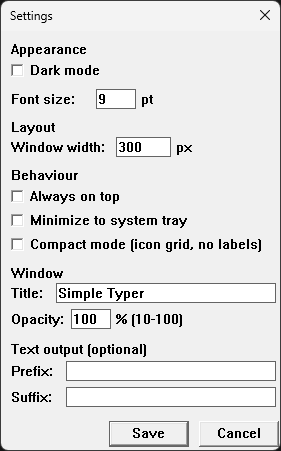
- Dark mode, configurable font size and window width
- Always on top, minimize to system tray
- Right-click buttons to Edit / Delete / Duplicate / Move Up / Move Down
- Separator (divider) lines between buttons
- Optional custom ICO icon per button
- Remembers last window position
- Window opacity and configurable title
- Button tooltips showing a preview of stored text on hover
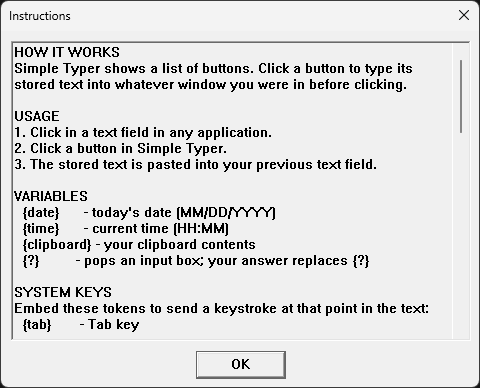
- Variables: {date} {isodate} {time} {clipboard} expand automatically when typed
- Fill-in-the-blank: {?} in button text pops a small input box first
- Global text prefix and suffix appended to every button's output
- Search/filter bar - type to instantly filter buttons by name
- Compact mode - icon-only grid palette for a tiny always-on-top layout
- Categories - collapsible group headers to organise buttons
- Keyboard shortcuts - optional global hotkey per button
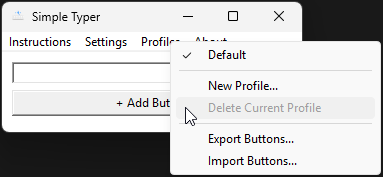
- Multiple profiles - switchable INI sets from tray or Profiles menu
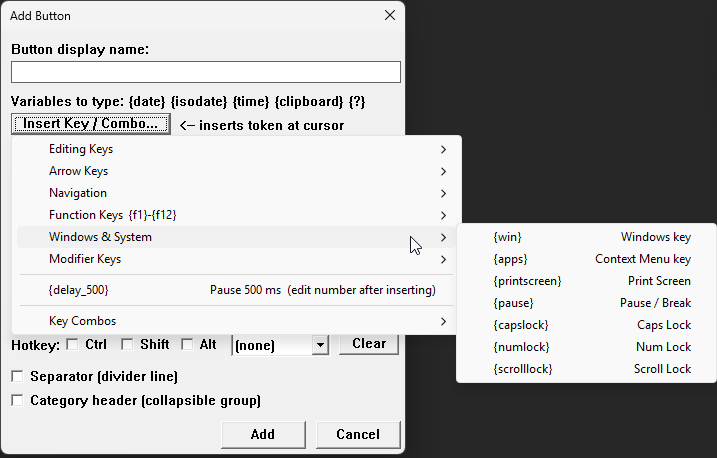
- System key tokens - {tab} {enter} {esc} {win} {f1}-{f12} etc. send keystrokes mid-text
- Chord tokens - {win+r} {ctrl+shift+esc} {alt+f4} etc. send key combos mid-text
- Delay token - {delay_####} pauses output for #### milliseconds mid-sequence
- Undo Delete - Ctrl+Z or right-click restores the last deleted button
- Export / Import buttons to and from a portable INI snippet file
- Drag-and-drop button reordering in the normal list view
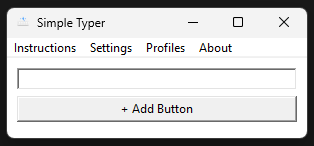
Main Window
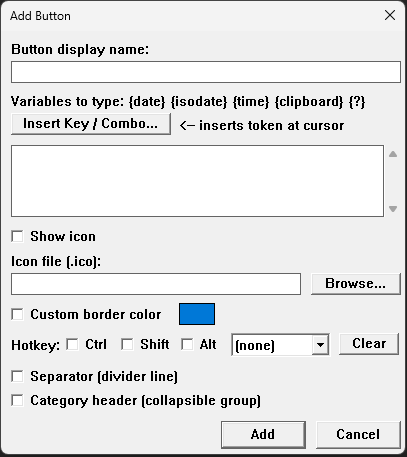
Add Button
Insert Keystrokes
Settings
Profiles
Instructions
Nothing is ever expected for the hoarding of digital files, creations I have made, or the people I may have helped.
Ordering from Lab401? USE THIS LINK FOR 5% OFF! (Or code UberGuidoZ at checkout.)
I've had so many asking for me to add this.
BTC: 3AWgaL3FxquakP15ZVDxr8q8xVTc5Q75dS
BCH: 17nWCvf2YPMZ3F3H1seX8T149Z9E3BMKXk
ETH: 0x0f0003fCB0bD9355Ad7B124c30b9F3D860D5E191
LTC: M8Ujk52U27bkm1ksiWUyteL8b3rRQVMke2
PayPal: uberguidoz@gmail.com
So, here it is. All donations of any size are humbly appreciated.
Donations will be used for hardware (and maybe caffeine) to further testing!