Creating a *Fun* Game
Quick note: all of the files created in this tutorial can be accessed here.
So you know how to create a game. Well, it's more like a useless program that doesn't do anything. Either way, it's time to move on to more interesting things. In this section, you will create a simple number guessing game.
By the end of this section, you should be familiar enough with the basic features of the ModernRift game engine to create your own game. First, we follow these steps to create a game. Here's what I used as a configuration file:
{
  "Config": {
    "name": "Number Guessing Game",
    "description": "A number guessing game",
    "creatorName": "ModernRift",
    "version": "1.0",
    "windowTitle": "ModernRift Example 02: Number Guessing Game",
    "prompt": "Enter Command: ",
    "backgroundColor": "DarkBlue",
    "textColor": "White"
  }
}Before we can begin typing code, we need to think of a plan and create a flowchart. Here's what I came up with (apologies, dark mode users):
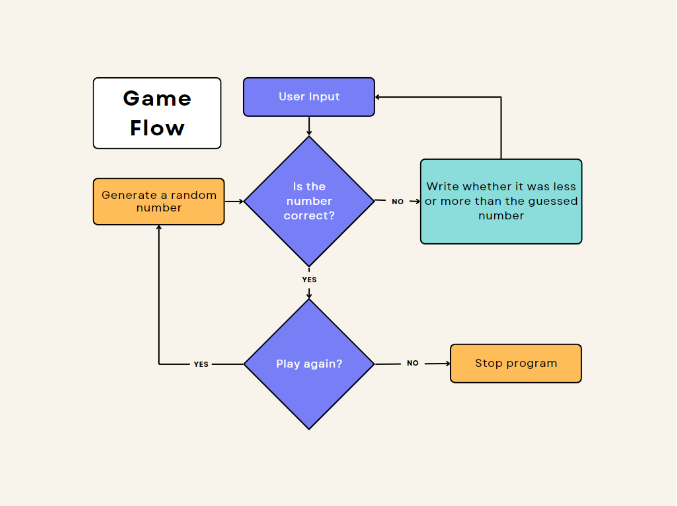
Alright! Now that we have our game flow figured out, it's time to implement it.
Let's first create the function in our game class that will generate the random number. We'll also create a variable to store the number in.
public int number;

public void GenerateNumber(int min, int max)
{
  Random rnd = new Random();
  number = rnd.Next(min, max + 1);
}
Why do we add 1 to the maximum value? Good question! Random.Next(int, int) takes 2 values, a minimum and a maximum. However, the maximum is exclusive, which means that Next(1,10) would return one of the following:
1, 2, 3, 4, 5, 6, 7, 8, or 9, but never 10. We don’t want that, so we add 1 to the maximum value.
Awesome! Now we can generate a random number. Let’s use that in the game.
The ModernRift game engine comes with a number of predefined functions that can be overridden and modified. We will use 2 of them to create our start command.
First, let's create a directive called GenerateDirective in the root of the game class. While we do that, we might as well add our StartCommand as well:
Directive GenerateDirective;
Command StartCommand;
Now, we'll set the values of GenerateDirective and StartCommand in the Initialize() function.
public override void Initialize()
{
  configuration = new Configuration.ConfigurationBuilder().FromConfigFile("configuration.json").Build();

  GenerateDirective = new Directive(() => { GenerateNumber(1, 10); });
  StartCommand = new Command("start", "Starts a new game.", GenerateDirective);
}
Great! Our final step is adding the command to the game. There are 2 ways to do this. One of them specifically adds it to the game class, the other one adds it to whichever game class the engine is currently referencing. This is a subtle distinction that doesn’t matter right now. We will use the simpler method, which is using the AddCommand function. Remember that the AddCommand should not be done in Initialize, but in Start. We need to override the start function and add one line:
public override void Start()
{
  AddCommand(StartCommand);
}
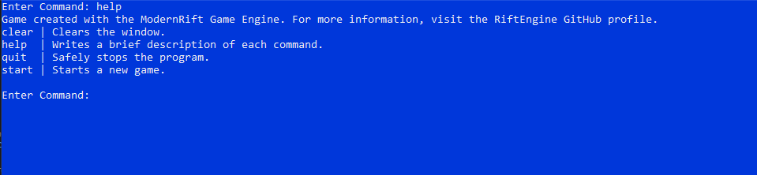
Excellent! Now you can run the game and type help. You will see a list of commands, including the start command!
Now is when it starts to get a little bit more complicated and game-specific. If we refer to our flowchart from the beginning of this tutorial, we see we still need to do some things:
- Get user input
- Compare user input and the generated number
- Tell the user which was higher
- Repeat until the user guesses correctly
This means that our next step is getting user input. Well, guess what? ModernRift has a feature for that. Two, actually. The first is commands, which you've already learned how to use. The other is Subroutines.
A subroutine is essentially a game class that is run inside of a command. You cannot have multiple subroutines running at the same time, despite the name.
First of all, we need to create two more directives:
Directive UpdateSubroutineDirective;
Directive StartMainSubroutineDirective;
Now, we also need to create a subroutine. Let's create a new class called LoopSubroutine that extends Subroutine:
public class LoopSubroutine : Subroutine
{
  public override bool IsDone() {
  }

  public override void Initialize()
  {
  }

  public override void Start()
  {
  }

  public override void Update()
  {
  }

  public override void End()
  {
  }
}
Let's create a variable to keep track of whether or not we're done playing:
private bool _isDone = false;

public override bool IsDone()
{
  return _isDone;
}
This is the blank structure of a subroutine. You’ll notice a lot of similarities between subroutines and game classes. However, an important difference is that you must override all of the subroutine methods, whereas you only need to override the methods you want to in game classes.
In this subroutine, let's go ahead and create a variable to store the target number:
public int targetNumber;Now, we'll create a function to set the target number.
public void SetTargetNumber(int targetNumber)
{
  this.targetNumber = targetNumber;
}
We can remove the extra space from the Start, and Initialize functions. All of the content will be in the Update function. Let’s fill that out now. First, we need to tell the user to enter a guess. Then, we need to store their response in a variable. Then, we need to try to convert it to an integer and tell the user if the text they entered was invalid. Wait a minute- how do we do that!? Let’s create a function to handle it called ValidateGuess.
public bool ValidateGuess(string guess)
{
  try
  {
      int.Parse(guess);
      return true;
  } catch
  {
      return false;
  }
}
Cool! Now we can fill up the update functino:
public override void Update()
{
  Console.Write("Enter a guess between 1 and 10: ");
  string guess = Console.ReadLine();
  if(!ValidateGuess(guess))
  {
      Console.WriteLine("The guess was not a valid number. ");
      return;
  }
  int value = int.Parse(guess);
  if(value < targetNumber)
  {
      Console.WriteLine("Your guess was too low.");
  } else if(value > targetNumber)
  {
      Console.WriteLine("Your guess was too high.");
  } else
  {
      Console.WriteLine("Your guess was correct! Congratulations!");
  }
}
What this does is it gets the users input, then validates it. If it’s problematic, it will return from the function so that it doesn't throw any exceptions. If it’s valid input, then it compares it to the target number and tells the user whether their guess was too low, too high, or correct.
Now, we need to set _isDone to false so we can play again, but we have to do that in the End() function.
public override void End()
{
_isDone = false;
}
Great! Now we just have to figure out our directives and we'll be good to go!
Back in the game class, let's look at the Initialize function. After we set the value of GenerateDirective, we should set the values of the other two directives we made. At the very top, let's set the value of mainSubroutine to a new instance of the subroutine we just created.
Here's what it should look like once you're done:
public override void Initialize()
{
  configuration = new Configuration.ConfigurationBuilder().FromConfigFile("configuration.json").Build();

  mainSubroutine = new LoopSubroutine();

  GenerateDirective = new Directive(() => { GenerateNumber(1, 10); });

  UpdateSubroutineDirective = new Directive(() => { mainSubroutine.SetTargetNumber(number); });

  StartMainSubroutineDirective = new Directive(() => { SubroutineManager.StartSubroutine(mainSubroutine); });

  StartCommand = new Command("start", "Starts a new game.", GenerateDirective);
}
The very last thing we have to do is add the two other directives to the start command, so that the final line of the function looks like this:
StartCommand = new Command("start", "Starts a new game.", GenerateDirective, UpdateSubroutineDirective, StartMainSubroutineDirective);Now you’re ready for a test run! Start the program and type start to start the game. Enter a guess and the program will tell you if you’re too high or too low. Once you’re done playing, type quit to stop the program.
Now that you've learned how to create a simple game, I have a few challenges for you.
- Count how many guesses the user takes.
- Add a maximum number of guesses.
- Lower the maximum number of guesses when the player successfully guesses the number.
- Keep track of high scores.
These are mostly ranked in order of predicted difficulty, but the difficulty will be different for everyone. Note: Each challenge builds off of the previous challenge, so it is recommended to complete them in order.
Here are my solutions for each of the challenges: 1 2 3 4
There are many ways to do it, and my solutions may not be the best. Create an issue if you have an improvement to one of them, or share it in your own repository.