




openadapt-viewer turns the results of a GUI agent run into one HTML file. Open it in a browser to see pass and fail counts, filter the task list, and step through each task's screenshots, with the action and the agent's reasoning under each one. There is no server to run. Keep the file with the run, or embed the screenshots in it and send it to a colleague.
It is for developers who run agents against desktop or web tasks, or who build on OpenAdapt, and want to see what happened in a run without writing a dashboard.
pip install openadapt-viewer
openadapt-viewer demo --output viewer.html
Generating demo viewer with 10 sample tasks...
Generated: viewer.html
Open viewer.html in a browser and select a task:
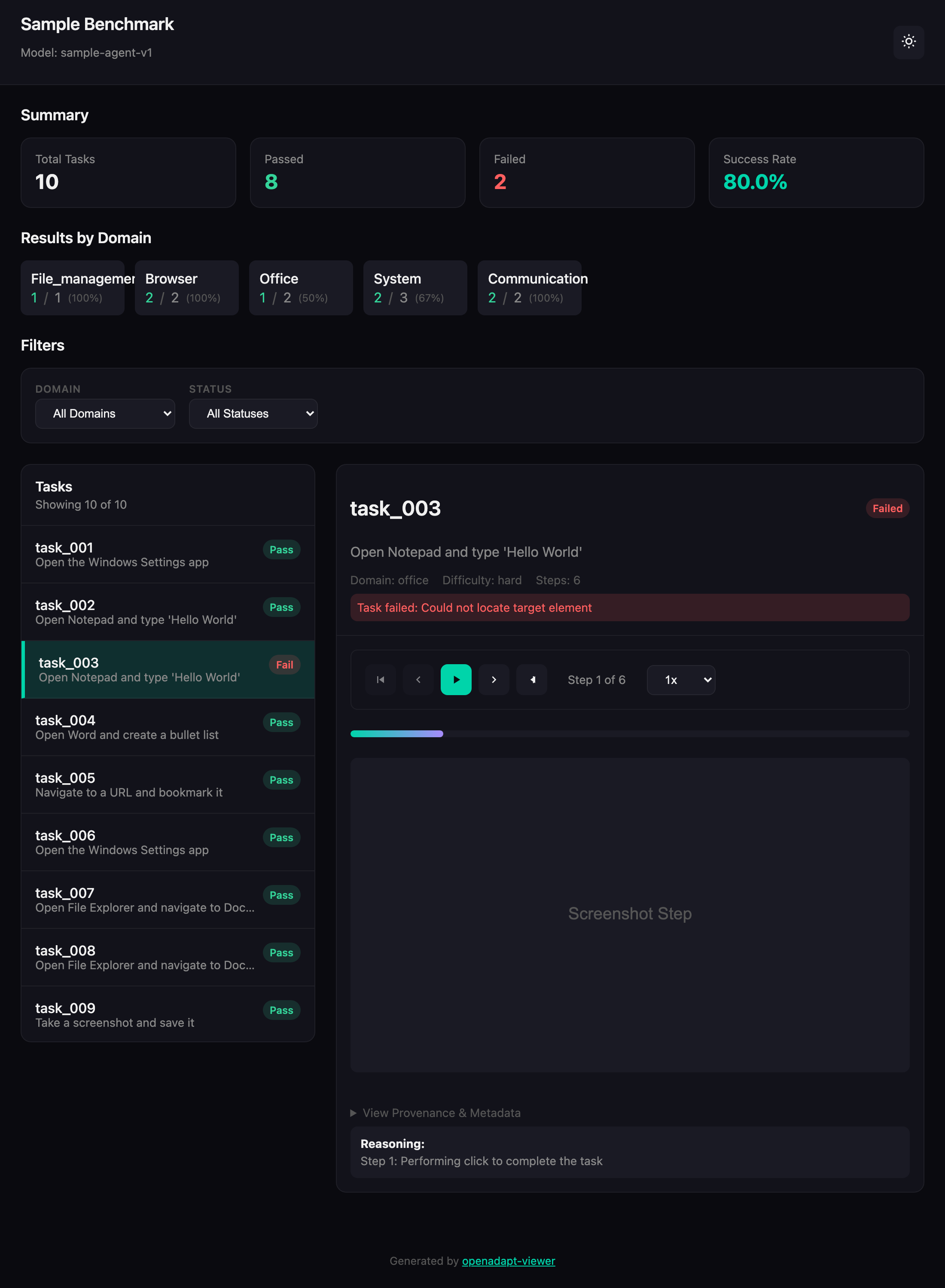
The demo generates 10 sample tasks with random results, so your numbers will
differ.
Add --open to open the page in your default browser.
openadapt-viewer benchmark reads a run from a directory laid out like this:
my-run/
├── metadata.json          {"benchmark_name": "Notepad smoke test", "model_id": "my-agent-v2"}
└── tasks/
    └── task_001/
        ├── task.json      {"task_id": "task_001", "instruction": "Open Notepad and type hello", "domain": "office"}
        ├── execution.json {"success": true, "steps": [...]}
        └── screenshots/
            ├── step_000.png
            └── step_001.png
Each entry in steps is one action. The viewer shows description under the
screenshot, and reasoning below it when present:
{"action_type": "click", "action_details": {"description": "Click the Start button"}, "reasoning": "Notepad is not open yet"}step_000.png is the screenshot for the first step, step_001.png for the
second, and so on. A failed task can carry an error string in
execution.json, which the viewer shows above its steps. Then build the page:
openadapt-viewer benchmark --data my-run --output my-run.html --standaloneGenerating benchmark viewer from: my-run
Generated: my-run.html
--standalone embeds the screenshots in the HTML, so the file keeps its images
after you move it or attach it to an email. Without it, the page links to the
PNG files and shows them as long as they and the page stay where they are.
To view a recording made with
openadapt-capture, pass the
recording directory as --data instead. It needs the recording.db that
openadapt-capture writes and an episodes.json from the segmentation step in
openadapt-ml, which splits the
recording into tasks.
Each component is a Python function that returns an HTML string, so you can
use one inside a template you already have. PageBuilder puts components
together into a complete page with the stylesheet inlined:
from openadapt_viewer.builders import PageBuilder
from openadapt_viewer.components import badge, metrics_grid

page = PageBuilder(title="Nightly eval", dark_mode=False)
page.add_header(title="Nightly eval", subtitle="run 2026-10-14")
page.add_section(
    metrics_grid([
        {"label": "Tasks", "value": 42},
        {"label": "Passed", "value": 39, "color": "success"},
        {"label": "Failed", "value": 3, "color": "error"},
    ]),
    title="Summary",
)
page.add_section(badge("Pass", color="success"))
print(page.render_to_file("eval.html"))
dark_mode=False opens the page in the light theme. The button in the header
switches themes either way. The
component reference
lists all 22 components with their signatures, including screenshot overlays,
action timelines, filter bars, side-by-side comparisons, and failure-analysis
panels.
generate_capture_html writes a player for a list of steps, with play, pause,
and step controls:
from openadapt_viewer.viewers.capture.generator import generate_capture_html

steps = [
    {"timestamp": 0.0, "duration": 1.2, "action": {"type": "click", "x": 0.42, "y": 0.31}},
    {"timestamp": 1.2, "duration": 2.4, "action": {"type": "type", "text": "Jane Doe"}},
    {"timestamp": 3.6, "duration": 0.9, "action": {"type": "click", "x": 0.78, "y": 0.64}},
]

print(generate_capture_html(
    capture_id="turn-off-nightshift",
    goal="Turn off Night Shift in Display settings",
    steps=steps,
    output_path="capture_viewer.html",
))
Give a step a "screenshot" key, holding a path relative to the HTML file or a
data URI, and the player shows that frame with a marker where the click landed.
x and y are fractions of the frame, so 0.42 means 42% of the way across.
- As of October 2026, PyPI has version 0.2.0. It ignores
--standalone, marks a task failed when itsexecution.jsonhas notask_id, does not readrecording.db, and its capture player does not render. Until a newer release is on PyPI, install from GitHub withpip install git+https://github.com/OpenAdaptAI/openadapt-viewer. - The page loads Alpine.js from
cdn.jsdelivr.net. Offline, the summary cards still render, but the task list and the playback controls do not work. - The
benchmarkcommand reads the run layout above or an openadapt-capture recording. Results from other harnesses need converting to that layout first. - Recordings made before 2026-07-17 store a
capture.db, which this version does not read. Thebenchmarkcommand stops with an error that names the openadapt-capture script that converts it.
openadapt-viewer --help lists every command.
openadapt-viewer catalog scan --capture-dir DIR indexes recordings into
~/.openadapt/catalog.db so that openadapt-viewer segmentation can find
them, and openadapt-viewer catalog stats prints the counts.
git clone https://github.com/OpenAdaptAI/openadapt-viewer && cd openadapt-viewer
uv sync --all-extras
uv run ruff check .
uv run pytest tests/ -v
Three test modules read recordings that openadapt-capture wrote, rather than fixtures written to match this repository's idea of the schema. They skip when no openadapt-capture checkout is found. Clone it alongside and point the tests at it:
export OPENADAPT_CAPTURE_DIR=/path/to/openadapt-capture
export OPENADAPT_CAPTURE_EXAMPLES=$OPENADAPT_CAPTURE_DIR/examples/captures
CI runs Python 3.10 and 3.11 on Ubuntu and macOS. ruff check . is a blocking
check over the whole repository. To regenerate the screenshot above, run
uv run python scripts/generate_demo_screenshot.py.
MIT. See LICENSE.