



This addon blocks websites from using javascript to port scan your computer/internal-network and also dynamically blocks all LexisNexis endpoints from running their invasive data collection scripts.
 The GUI allows the user to turn on or off global blocking, notifications and add domains to a whitelist using the gear in the top right corner. The GUI allows the user to turn on or off global blocking, notifications and add domains to a whitelist using the gear in the top right corner. |
 Add or remove domains from the whitelist such that if they make a local request or request a Lexis Nexis script, it will be allowed. Add or remove domains from the whitelist such that if they make a local request or request a Lexis Nexis script, it will be allowed. |
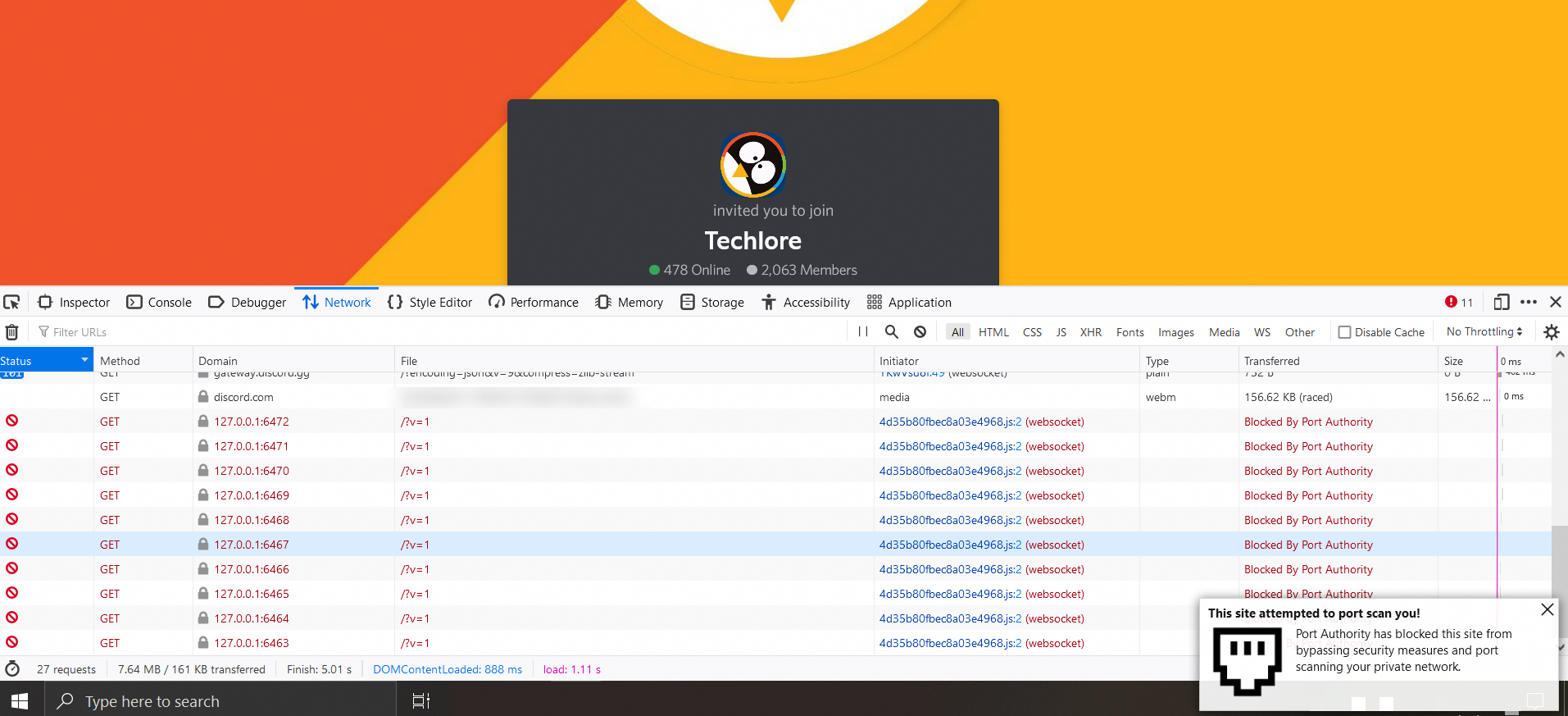 Discord port scans your computer using websockets, attempting to connect with the desktop Discord app. Discord port scans your computer using websockets, attempting to connect with the desktop Discord app. |
- Blocks all possible types of port scanning through your browser (HTTP/HTTPS/WS/WSS/FTP/FTPS)
- Dynamically blocks the ThreatMetrix tracking scripts made by one of the largest and least ethical data brokers in the world (Lexis Nexis)
- Easily auditable, with the core functionality being about 250 lines of code. HERE
- Provides an optional allowlist to prevent portscans and tracking scripts from being blocked on trusted domains, IP addresses, and CIDR ranges
- Gives a nice notification when one of the above scenarios are blocked
- This addon doesn't store or log browsing history. Blocking decisions stay in memory for the current browser session (badge counters / blocked host lists per tab). To decide whether a third-party host is a LexisNexis/ThreatMetrix endpoint, the addon may issue a DNS CNAME lookup via Firefox's
dnsAPI for hosts that are not already on the known ThreatMetrix suffix list; results are cached in memory for the session only and are never written to disk or sent to any Port Authority server. - Prompts you when a page from the internet tries to navigate you to a local address, letting you allow or block on a per-origin basis
When a page on the internet contains a link to a local address (e.g. http://localhost:8080), Port Authority blocks the navigation by default. Rather than failing silently, it opens a separate decision window (not the toolbar popup) so you can decide what to do. A desktop notification is also shown pointing you at that prompt.
This UI only appears at the moment such a navigation is blocked. You will not see Allow Once / Always Allow in the normal extension popup or settings until after you have saved an Always Allow entry.
The popup shows:
- The external origin that contained the link (e.g.
github.com) - The local address being navigated to
- The request protocol
Your options:
| Button | Effect |
|---|---|
| Block | Request stays blocked. Nothing is saved. |
| Allow Once | Allowed for the rest of this browser session. Resets on browser restart. |
| Always Allow | The origin → destination pair is saved to extension settings. Future navigations from the same origin to the same local host are allowed immediately without prompting. |
Saved "Always Allow" entries can be reviewed and removed from the extension settings page (gear icon in the popup).
Note: This prompt only appears for full page navigations (
main_frame) to literal local/private addresses. Background requests —fetch, XHR, iframes — and DNS-rebinding style probes are still silently blocked and logged in the extension popup. Permissions are keyed byURL.host(host + port), not by path or scheme.
Manual check: serve or host TestPortScans.html from a non-local origin and use the Selective Allow links on that page.
- Domains (e.g.
discord.com) match the page origin only — including an optional non-default port when present - IP addresses (e.g.
127.0.0.1) without a port match that address on any port for both the page origin and local request destinations - CIDR ranges (e.g.
192.168.1.0/24) match any IPv4/IPv6 address in the range, which is useful for homelab UIs such as Proxmox
- Monero Address:
89jYJvX3CaFNv1T6mhg69wK5dMQJSF3aG2AYRNU1ZSo6WbccGtJN7TNMAf39vrmKNR6zXUKxJVABggR4a8cZDGST11Q4yS8
- Local address detection uses the URL API and
global/privateAddress.jsrather than matching raw URL strings with a regex - Classification covers IPv4 private/loopback/link-local/CGNAT/benchmarking ranges, IPv6 loopback/ULA/link-local, IPv4-mapped and IPv4-compatible IPv6, and the exact
localhosthostname - Alternate IPv4 encodings (integer, hex, octal, short-form) are normalized by the URL parser before range checks
- DNS private-IP blocking is limited to rebinding-like hostnames (embedded IPs, nip.io/sslip.io/etc.) so content-blocker sinkholes to
0.0.0.0/127.0.0.1are not reported as port scans - ThreatMetrix blocking uses an explicit, auditable suffix list (
online-metrix.net,threatmetrix.com,lexisnexisrisk.com,lnrsoftware.com) matched against both the request hostname and any DNS canonical name - Hostnames that already match that list are blocked without a DNS lookup
- Same-site branded customer endpoints (e.g.
tmx.bestbuy.comonbestbuy.com, where Firefox setsthirdParty: false) are still CNAME-checked when the request host differs from the page host - Other third-party hosts may still be CNAME-checked once per hostname per session via an in-memory LRU; rebinding-like names skip the cache so a later private answer is not masked
- Hostname compares strip trailing dots so FQDN forms like
h.online-metrix.net.still match - Transient DNS failures fail open (request allowed) after an explicit catch; known ThreatMetrix suffixes do not depend on DNS and are still blocked
- Allowlist matching lives in
global/allowlist.js: domains use exactURL.hostequality; portless IP entries and CIDR ranges use shared IP helpers fromglobal/privateAddress.js - Selective Allow (issue #57) lives in
global/selectiveAllow.js: onlymain_framerequests to literal local URLs are prompted; allow decisions are bound to a server-issuedpromptIdand the stored pending record. Allow Once is session-only; Always Allow is storage-only so removing a pair in settings takes effect immediately.file://andblob:initiators use path/href keys (not a shared protocol token);data:initiators stay on the silent block path. Pending prompts are created atomically per origin→destination pair and clear when the decision window/tab is closed (or if the UI cannot be bound to an id).
Unit tests cover private-address classification, request-filter decisions (port scans, DNS rebinding, ThreatMetrix CNAMEs, allowlist including IP/CIDR), Selective Allow validation, storage helpers, notifications/badges, allowlist parsing, DOM helpers, and manifest wiring.
npm test
# or: node tests/run.js
Tests run on Node 18+ with no extra dependencies and are executed in CI on pushes/PRs to main and dev.
- A webpage I made to test all forms of scanning in one location using the ./TestPortScans.html file
- Site where you can test if HTTP port scanning works: https://defuse.ca/in-browser-port-scanning.htm
- Site where you can test if HTTP port scanning works: https://inteltechniques.com/logger/
- Site where you can test if HTTP port scanning works (Output gives false positives): http://samy.pl/webscan/
- Click CTRL + Shift + I to see the networking tab where the blocked port scans will be shown.
- Site where you can test if WebSocket port scanning works: https://discord.com/invite/32ZNZVN
- Click CTRL + Shift + I to see the networking tab where the blocked port scans will be shown.
- The full list of endpoints can be found HERE.
Display notifications to you
- This is needed so the addon can alert you when a malicious script is blocked or javascript port scanning is blocked.
Access browser tabs
- This is needed so the addon can display the correct number of blocked requests on a per-tab basis.
Access your data for all websites
- This is needed because the addon needs to check every request your browser makes to determine if it needs to be blocked.
Back in May of 2020 eBay got caught port scanning their customers. I noticed that all of the articles covering this topic mentioned that there was nothing you could do to prevent it... so I wanted to make one. After going down many rabbit holes, I found that this script which was port scanning everyone is, in my opinion, malware.
Here's why I think that:
- The data being exfiled from your computer is encrypted into an image with XOR.
- The domain it reaches out to is made to look legitimate but redirects using a CNAME record to Lexis Nexis' servers.
- It can determine your “real IP” address even if you use a VPN / Proxy HERE.
- The javascript is assembled via string.join (like malware often does) and then executed in a service worker.
- Each time you load the page, the javascript is re-obfuscated.
- The script collects 416 pieces of personally identifiable information about you and your network. ( Shown HERE )
- They talk about trying to bypass adblockers by using encryption in their customer onboarding documentation HERE
So I developed multiple ways to stop this. The first being the existing functionality built into Port Authority. By default, Port Authority blocks requests whose hostname (or DNS canonical name) is under known Lexis Nexis / ThreatMetrix infrastructure, and you will receive a notification. Customer-specific domains that CNAME into that infrastructure are still caught via a session-cached DNS lookup. The second is a Python script I wrote which uses Shodan to find all of Lexis Nexis' customer-specific domains on the internet HERE. You can add the script's output to a blocker such as uBlockOrigin to prevent your computer from connecting to them.
Note: Static blocklists will never include every customer-specific endpoint. Port Authority's dynamic CNAME check covers hosts that resolve into the known Lexis Nexis / ThreatMetrix suffix list; endpoints fronted only by unrelated CDN names without those suffixes may still require a complementary filter-list entry.
Most of these sites are using Lexis Nexis's Threat Metrix scripts, Dan Nemec has a great blog post reverse engineering the script and showing all the invasive data collected https://blog.nem.ec/2020/05/24/ebay-port-scanning/
Zachary Hampton wrote some tools to reverse engineer the ThreatMetrix scripts. Go check it out https://github.com/ZacharyHampton/tmx-solver
- Solver
- Deobfuscator
- Harvester
- Payload Decryption Site
- Network Comparator (compare solver to real implementation)
USING SOCKS5 PROXIES WITH THIS ADDON WILL CAUSE DNS LEAKS DUE TO HOW FIREFOX HANDLES CNAME LOOKUPS. FOR MORE INFORMATION SEE HERE #7 (comment)
- There is a simple fix for this. Type
about:configin your browser, accept the warning, search fornetwork.trr.modeand change it to3 - Hosts already on the known ThreatMetrix suffix list are blocked without an extra DNS query; other third-party hosts may still trigger one session-cached CNAME lookup each while blocking is enabled.
- Port to Chromium
Add a whitelist